How simple you think is, sending an e-mail from your mail server when the emails
to be sent is enormous in number. The complexity is more than what we can imagine,
from in-house email solution or licensing issues, installing to operating a third-party
email service and cost. You need to put an effort on coding a reliable and robust
solution, configuring mail servers; ensuring deliverability and managing the
spam. This can lead to budgetary constraints for the SMEs or startups. This
is where, you need to re-think your strategy and go for solution with easy integration,
reliability and affordable cost like Amazon Simple Email Service (SES).
Amazon SES is an outbound-only email-sending service that provides an easy, cost-effective
way for you to send email. You can use Amazon SES to send high volume marketing
emails such as special offers, transactional emails such as order confirmations,
and other types of correspondence such as newsletters. You only pay for what
you use, so you can send as much or as little email as you like.
Understanding what Amazon SES can do for you:
The following diagram shows the basic Email sending process. It involves a sender,
email sending server which uses internet to send your mail through ISP (Internet
service provider) to recipient.
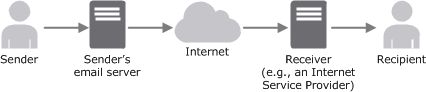 (courtesy: Amazon.com)
Now, Let us see what difference it makes using Amazon's SES.
 (courtesy: Amazon.com)
When you use Amazon SES, Amazon SES becomes your outbound email server. You can also
keep your existing email server and configure it to send your outgoing emails
through Amazon SES so that you don't have to change any settings in your
email clients. A sender can generate the email content in different ways. A sender
can create the email by using an email client application, or use a program that
automatically generates emails, like an application that sends order confirmations
in response to purchase transactions.
You can learn more at
http://docs.aws.amazon.com/ses/latest/DeveloperGuide/Welcome.html
Sending emails using Amazon SES’s AWSSDK for .Net:
1. Download AWSSDK from http://aws.amazon.com/sdkfornet/
2. Add a reference to awssdk.dll in your .Net project
3. Add the namespaces
using Amazon.SimpleEmail;
using Amazon.SimpleEmail.Model;
Sample Code using C# to send an Email using Amazon’s SES:
using Amazon.SimpleEmail;
using Amazon.SimpleEmail.Model;
namespace AmazonSES.Sample
{
public class AmazonSendMail
{
AmazonSimpleEmailServiceClient client = null;
string _amazonAccessKey = string.Empty;
string _amazonSecretKey = string.Empty;
string _emailFrom = string.Empty;
string _emailSubject = string.Empty;
string _emailBody = string.Empty;
string _emailReturnPath = string.Empty;
ArrayList _emailToList = new ArrayList();
ArrayList _emailCcList = new ArrayList();
ArrayList _emailBccList = new ArrayList();
public string EmailFrom
{
set { _emailFrom = value; }
}
public string EmailSubject
{
set { _emailSubject = value; }
}
/// <summary>
/// Can pass HTML for mail body
/// </summary>
public string EmailBody
{
set { _emailBody = value; }
}
public string AmazonAccessKey
{
set { _amazonAccessKey= value; }
}
public string AmazonSecretKey
{
set { _amazonSecretKey = value; }
}
public ArrayList EmailToList
{
set { _emailToList = value; }
get { return _emailToList; }
}
public ArrayList EmailCcToList
{
set { _emailCcList = value; }
get { return _emailCcList; }
}
public ArrayList EmailBCCToList
{
set
{
_emailBccList = value;
}
get { return _emailBccList; }
}
public string EmailReturnPath
{
get
{
return _emailReturnPath;
}
set
{
_emailReturnPath = value;
}
}//bounced mails
public bool SendMail()
{
bool sendSuccessful = false;
try
{
AmazonSimpleEmailServiceConfig config = new AmazonSimpleEmailServiceConfig();
config.UseSecureStringForAwsSecretKey = false;
client = new AmazonSimpleEmailServiceClient(this._amazonAccessKey, this._amazonSecretKey, config);
SendMultipleEmails();
sendSuccessful = true;
}
catch (Exception excep)
{
//Handle Exception Accordinly
}
return sendSuccessful;
}
/// <summary>
/// Please note that your sending quota applies here and that you can send to max.
50 emails in one method call.
/// That means you must divide your email array / queue / sending list in groups
of 50 by 50
/// </summary>
private void SendMultipleEmails()
{
Destination emailDestination = new Destination();
emailDestination.WithToAddresses((string[])_emailToList.ToArray(typeof(string)));
if (_emailBccList.Count>0)
{
emailDestination.WithBccAddresses((string[])_emailBccList.ToArray(typeof(string)));
}
if (_emailCcList.Count>0)
{
emailDestination.WithCcAddresses((string[])_emailCcList.ToArray(typeof(string)));
}
Body emailbdy = new Body();
emailbdy.Html = new Amazon.SimpleEmail.Model.Content(_emailBody);
Amazon.SimpleEmail.Model.Content title = new Amazon.SimpleEmail.Model.Content(_emailSubject);
Message message = new Message(title, emailbdy);
SendEmailRequest mailRequest = new SendEmailRequest(_emailFrom, emailDestination, message);
mailRequest.ReturnPath = this._emailReturnPath;
SendEmailResponse mailResponse = client.SendEmail(mailRequest);
SendEmailResult mailResult = mailResponse.SendEmailResult;
}
}
}