Fill ListView using Parallel.For/ Parallel.Foreach and ConcurrentBag
Avoid thread safe problem using Parallel.For/ Parallel.Foreach and ConcurrentBag to fill the ListView.
If we have small list of items to add into ListView then we can easily use simple
looping but if the List of items is large then it will take time to add the items
into ListView. In this case we can use multithreading to process the items so
that we can speed up the process.
Problem-
Before explaining the problem know about thread safe. Thread safe means multiple
thread can access the common data without any problem.
As per the definition of ListView class, it is not thread safe means any instance members of ListVIew class are not guaranteed to be thread safe.
So, while using ListView with multithreading it may create the problem. To explain
this I have just written the following code-
First add the following namespaces-
using System.Threading.Tasks;
private void btnFillList_Click(object sender, EventArgs e)
{
try
{
lstView.Items.Clear();
Parallel.For(0, 1000, i =>
{
lstView.Items.Add(i.ToString());
});
}
catch (Exception ex)
{
MessageBox.Show(ex.Message);
}
}
In above code, I have used Parallel.For to process the items which will run parallel
thread. But I got this error-
“Cross-thread operation not valid: Control 'lstView' accessed from a thread
other than the thread it was created on.”
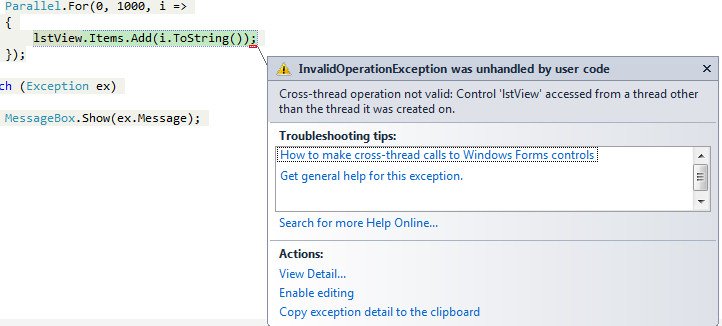
The reason of this error - ListView Class is not thread safe and in above code more
than one thread are trying to add the items to ListView because of that it is
generating error.
Workaround-
ListView class is not thread safe it doesn’t mean that we cannot use multithreading.
Here we have workaround for this. For this we can use ConcurrentBag<T> class which represents a thread-safe, unordered collection of objects. So I have
modified my code like this-
First add the following namespaces-
using System.Collections.Concurrent;
private void btnFillListConcurrentBag_Click(object sender, EventArgs e)
{
try
{
lstView.Items.Clear();
ConcurrentBag<ListViewItem> cbItems = new ConcurrentBag<ListViewItem>();
//Using multithreading to process the item
Parallel.For(0, 1000, i =>
{
ListViewItem item = new ListViewItem(i.ToString());
cbItems.Add(item);
});
//Finally adding items to ListView
lstView.Items.AddRange((ListViewItem[])cbItems.ToArray());
}
catch (Exception ex)
{
MessageBox.Show(ex.Message);
}
}
In above code, I have taken the array object of ConcurrentBag<ListViewItem>.
In the loop I am adding items to cbItems object. Here ConcurrentBag is thread
safe so it will not create any problem. Finally I am adding complete cbItems
object to ListView using lstView.Items.AddRange() method.
Note -
Same workaround can be used with Parallel.Foreach also.
This code is working without any error but ListView items will be unordered.
You can download the complete code from here- ListView
By Jitendra Faye Popularity (2877 Views)