In recent Build 2014 event, Windows Universal App was one of the exciting feature
that Microsoft rolled out to empower Windows Phone and Windows store apps development
in unified way. This code sharing strategies between Windows Phone 8.1 and Windows
8.1 makes it pretty easier to develop for both platform and sharing most of the
code and resource. This is pretty much similar to iOS development where you have
Universal apps that runs on both iPhone and iPad. It is really “One Windows 8
and rule them all” approach and today we are going to develop our first Windows
8 Universal app!
Though this is my first Universal app, there is already first universal app in windows
store called Halo: Spartan Assault in windows store as Microsoft has started
accepting Universal apps for the store!
To get started, please download Visual Studio 2013 Update 2 from the following links
based on your version of Visual Studio 2013.
• Visual Studio Ultimate 2013 with Update 2 RC
• Visual Studio Premium 2013 with Update 2 RC
• Visual Studio Professional 2013 with Update 2 RC
• Visual Studio Express 2013 for Windows with Update 2 RC
Please keep Visual Studio closed when you install this update and once you are done
with install open Visual studio and under C# template, notice Universal Apps
project template as shown in Figure 1.0.
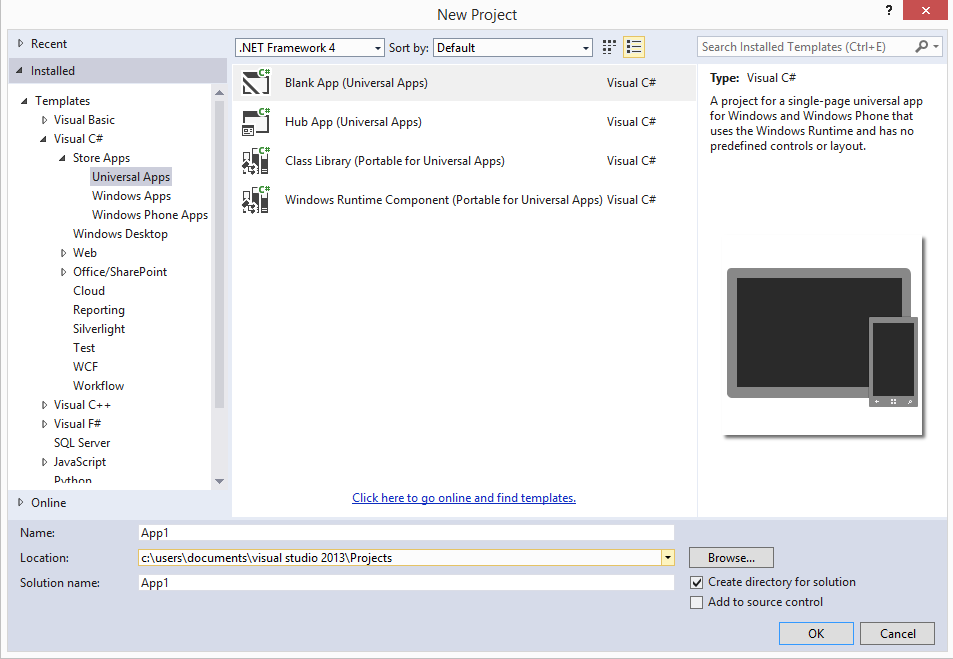
Figure 1.0 Visual Studio 2013 Universal App template for C#
Let’s create an MVVM Universal app! Go ahead and create project of type Universal
app and name it whatever you want.
When you see the solution created for you, you will notice three different projects
created as per Figure 1.1. One is for Windows 8.1, one for Windows Phone 8 and
one as shared project.
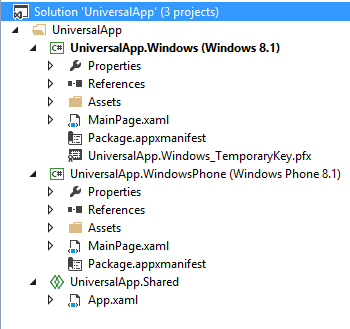
Figure 1.1 Universal project
In Windows 8.1 and Windows Phone 8, you can have your applications views which are
meant to be for particular resolution and device such as surface and windows
phone respectively. The shared project is where you,
1. Write your common code such as ViewModels, Models.
2. Write partial classes that can be used in both the application project
3. Create user control and custom control that can be reused in both the project.
4. Put resources such as images, resource files such as styles, templates, localization
etc
5. write code that does not fit entirely to specific platform by using #if directive
6. Should not put entire xaml page as shared control as space utilization is very
limited on Windows phone 8 compared to Windows 8.1 apps that run on device such
as Surface.
7. Should not put user control/custom control which uses controls that can’t be available
on both platform such as maps.
Now put following piece of xaml markup in both the MainPage.
<TextBlock FontSize="32" Text="{Binding Message}"></TextBlock>
Listing 1.0 TextBlock for MainPage
Add ViewModel class with following code in Shared project.
public class ViewModel : INotifyPropertyChanged
{
private string message;
public string Message
{
get { return message; }
set { message = value;
this.RaisePropertyChanged("Message");
}
}
public ViewModel()
{
this.Message = "Hi from Universal App!";
}
protected void RaisePropertyChanged(string propertyName)
{
if (this.PropertyChanged != null)
{
this.PropertyChanged(this, new PropertyChangedEventArgs(propertyName));
}
}
public event PropertyChangedEventHandler PropertyChanged;
}
Listing 1.1 ViewModel class
Note that Listing 1.1 shows very basic view model class where I am implementing INotifyPropertyChanged.
As a good practice you would usually have base class implements this interface.
Now in both MainPage’s code behind, set DataContext to new instance of this ViewModel
class as following.
this.DataContext = new ViewModel();
Listing 1.2 Setting DataContext for Both MainPage
Now just build solution and run each application project one by one and see that
you are getting the message displayed. A very simple example of easy code sharing
that Universal app template provides. Off course this is very basic MVVM app,
I encouraged you to try out three things on your own:
1. Read my earlier article on the Windows 8.1 Localization here and try to implement common Localized resource file (resw) for both Windows 8.1
and Windows Phone 8 in Universal app project template.
2. The another exciting thing came out in Build 2014 in Visual Studio 2013 Update
2 is, you can code Windows Phone app in Html, Js and CSS! Try out David Zordan’s
TypedMVVM, a MVVM framework developed upon TypeScript (TypeScript also made it’s
RTM release as announced in Build 2014!) and WinJs at http://typedmvvm.codeplex.com/
3. MVVM Light toolkit has its framework ready for Universal app! Just follow this
tutorial to get started with it for Universal apps
http://blog.galasoft.ch/posts/2014/04/building-a-universal-application-for-windows-phone-8-1-and-windows-8-1-with-mvvm-light/