C# : Populate the grid by executing SQL query or reading XML file
This windows application is the example of Gridview, SQL query and XML file integration which will give you the details how all these things workd together. Enjoy!!!
Create a form like below:
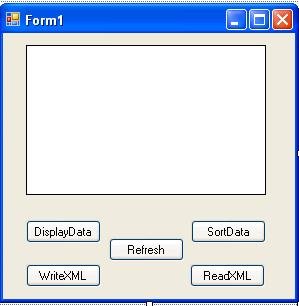
Add below code to Form.cs:
using System;
using System.Collections.Generic;
using System.ComponentModel;
using System.Data;
using System.Drawing;
using System.Text;
using System.Windows.Forms;
using System.Data.SqlClient;
namespace Database
{
public partial class Form1 : Form
{
SqlConnection
conn;
SqlDataAdapter da;
DataSet
ds;
public Form1()
{
InitializeComponent();
conn
= new SqlConnection("Data Source=Server name;Initial Catalog=database name;User ID=user; Pwd=password");
da
= new SqlDataAdapter("select * from tablename", conn);
ds
= new DataSet("MyDS");
}
private void DisplayButton_Click(object sender, EventArgs e)
{
conn.Open();
da.Fill(ds);
conn.Close();
dataGridView1.DataSource
= ds.Tables[0];
}
private void SortButton_Click(object sender, EventArgs e)
{
DataView
dview = new DataView(ds.Tables[0]);
dview.Sort
= " id DESC";
dataGridView1.DataSource
= dview;
dview.RowFilter
= "id > 10";
dataGridView1.DataSource
= dview;
dview.RowStateFilter
= DataViewRowState.Deleted;
dataGridView1.DataSource
= dview;
}
private void WriteXMLButton_Click(object sender, EventArgs e)
{
ds.WriteXml("c:\\local\\Records.xml");
}
private void ReadXMLButton_Click(object sender, EventArgs e)
{
ds.ReadXml("Records.xml");
dataGridView1.DataSource
= ds;
}
private void RefreshButton_Click(object sender, EventArgs e)
{
DataSet1
ds1 = new DataSet1();
da.Fill(ds1);
}
}
}
You can also use connection string from app.config file giveb below:
<?
xml version="1.0" encoding="utf-8" ?>
<
configuration>
<
configSections>
</
configSections>
<
connectionStrings>
<
add name="Database.Properties.Settings.myConnectionString"
connectionString="Data Source=Server name;Initial Catalog=database name;User ID=user;Password=password"
providerName="System.Data.SqlClient" />
</
connectionStrings>
</
configuration>
By Jignesh Shah Popularity (2664 Views)