IntroductionCreating an application that is efficient and appealing is one of the most difficult tasks of web development. The user has different backgrounds, expectations, levels of technical proficiency, and most of all, levels of patience.
Therefore, in order for an application to be successful it is very important to follow specific standards so that it has the least issues possible and at the same time maintains the level of acceptance high for the average user.
One example of an appealing application is one that does not require multiple steps for a single task, or that allows the user to work fluidly through the page, with no clutter or confusion.
On the other hand, maintaining the application efficient requires clever programming and careful design. Making too many last-minute changes can compromise the appeal and even performance of an application.
The purpose of this document is to give some high level information for project managers and stake holders so these standards can be held to an acceptable level of compliance. This document will also expand on some of the technologies and give practical examples of usage (even though they will be simple and should not be used as major templates for development)
In order to ease the burden on the reader, this document is divided into different sections and subsections. Please refer to each when deciding which tailors to your needs:
a. Documentation
i. Use Cases - Creating meaningful documents
ii. System Requirements - Forecasting usage
iii. Reporting - Effective and Productive progress
b. Designing
i. Intro to ORM (Object-Role-Modeling) - an already normalized design
ii. NUnit testing and tools
iii. Emulation of Production environment
iv. Debugging and optimization of code
v. Stress testing and tools
Use Cases - Creating meaningful documentsUse cases are very common in the development industry and create simple documents that are easy for domain experts and managers to follow, and comprehend, and approve.
A simple example of a Use Case is:
Use Case 1: User Registers onto the WebsiteSummary
When a New user visits the Website and Decides to join they are directed to the User Registration Page which is displayed and connected via SSL (https on port 443). Within the registration page the User inputs their personal information which includes:
· Full Name
· Contact Information
o Main and Alternate Phone numbers for contact (which may include: Home, Work, Fax, Cell, Pager, etc)
o Main Email Addresses
o Full Address (for mailings and winning items)
· Selection of Username (within 10 characters)
· Selection of Password and Password Hint
Upon completion of registration the User is redirected to the Current Promotions Page and receives an email confirmation welcoming him/her to the site along with basic information for using the site.
High Level
The User’s Contact information will not be categorized (derived but not stored) within a specific Range of Zip codes which will be called “Region”
Low Level
* NOTE that derived but not stored assumes that the zip codes will be input into the database but will not be categorized until a stored procedure selects all the zip codes within a parameter of the stored procedure.
Information that will be encrypted:
§ PasswordMost of the Use Cases have at least a summary and a basic flow or Action description; high level is mainly for managers and developers; low level is a more specific technological approach or explanation of the case.
For more information and templates on written use cases, please visit <
http://alistair.cockburn.us/Use+cases>
Use Cases can also be described graphically although their use should always include some written portion to allow non-developers to understand its concepts.
For more information on graphical Use Cases, please visit <
http://www.agilemodeling.com/artifacts/useCaseDiagram.htm>
Graphical Use Cases can be created with many tools. The most common Use Cases (UML) tools are Sparx Enterprise Architect and Microsoft Visio
System Requirements - Forecasting usageAny software has hardware and other software framework requirement. Be it a software patch or a specific amount of memory (RAM) it’s important to let stake holders know what is going to be used and how much is going to be spent on such requirements.
The system requirements allow IT managers, and staff, and developers plan for deployment and maintenance life cycles.
Nevertheless, carefully plan the requirements because changing them once they are signed upon can be a very pricy task, not to mention the amount of persuasion employed to convince stake holders to change.
System requirements may be described in documents but it’s also important to depict these requirements graphically. An example of a system requirement is below:
General Overview This is a website for blogs in which users can send messages according to their exact needs and criteria. The system should be at least 70% independent from human interaction - i.e. only reporting, and management should be manually controlled
High Level
Site will be composed of different technologies and systems to ensure that the system will run 24/7/365. The core infrastructure will be base on Windows and .Net framework and will have derived systems and other technologies. The infrastructure will have several servers for databases running as clusters and other servers for web services and web applications.
Low Level
The main website will be base on C# and ASP.Net
Web Services will have WSE (Web Service Enhancements) from Microsoft and will allow only certified clients to connect and retrieve data. (Reporting)
Live Reports will be displayed in Adobe Flex (with Action Script in the background).
Also, reporting services will be displayed to stake holder from the Data Warehouse. Live statistics will be sent to the Statistics Data Mart with updates of 20 minutes.The Production environment will have the proposed specifications (which may change): 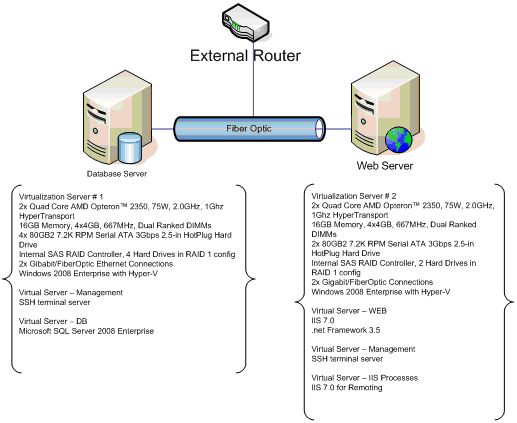
Reporting - Effective and Productive progress
Before the project is started and throughout the whole life of the project there should be a constant plan in motion. This plan should always take into consideration unexpected events, such as sickness, turn-over, budget issues, holidays, weather, etc. A good plan always has a critical path that is well tied and buffers one dependent task after the other.
Training developers to forecast can also be a good way to plan since each developer may produce code at different rates and efficiency. Some developers might need some additional tutoring for new skills and junior developers may need closer training and management. All of these may delay the project and should be included in this buffer so that no task delays the next (dependency management).
Tasks should also be managed carefully and divided among team members by complexity and priority, not only by amount. In some instances, code reviewing may cause delays if a major bug is found. Nonetheless, constant peer reviews should also be planned so that they provide the most benefit possible.
Reporting the plan to stake holders and higher managers can make or break not only the budget of the project, but also the project in itself. If constant progress is reported, stake holders have no reasons to question if the project is going to be successful. Also, reporting allows for small changes to be applied to tasks, even timelines and milestones, if a good business case is presented.
Reporting should be viewed as a tool and not a burden since it can steer the course of the project to success, even if delays are experienced.
One of the most common project forecasting tools available is Microsoft Project. Nevertheless, there are numerous applications and methods for planning a project.
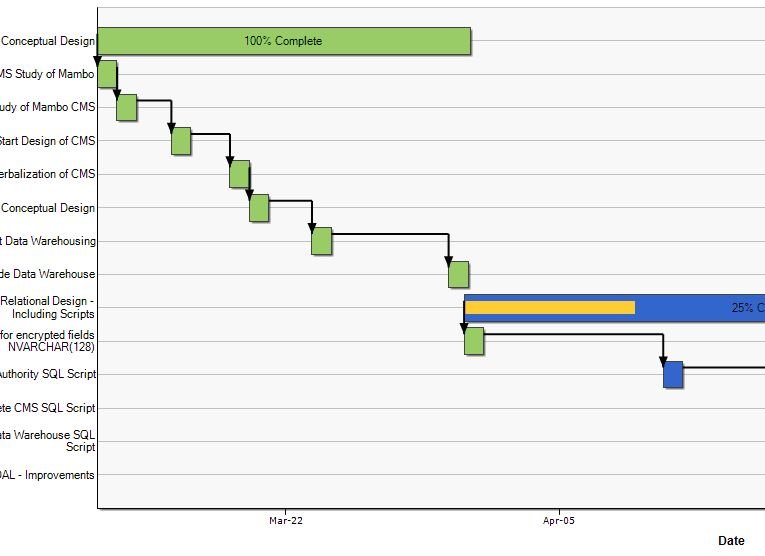
A simple example of a project time line (Gantt) is below:
 DesigningIntro to ORM (Object-Role-Modeling) - an already normalized design
Designing a normalized database without spending weeks in the process is a few can manage. Nevertheless, there are several methods for creating databases, including Baker ER, IDEFIX, UML, etc.
ORM is a relatively new conceptual schema language that allows the creating of a normalized Database with added features:
· Verbalization for domain expert approval is easy and simple
· Sample populations can be taken out of already existing reports and systems
· The end result of the conceptual schema is an already normalized relational schema
A simple example of an ORM conceptual schema is below: 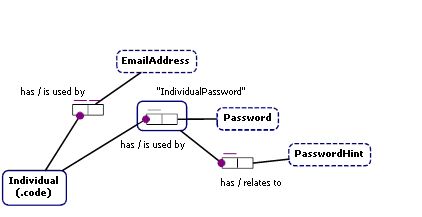
The schema above has the following verbalization:
Individual has Password.
Each Individual has exactly one Password.
It is possible that the same Password is used by more than one Individual.
Examples:
Individual 'usename1' has Password '12345'.
Individual 'usename2' has Password '5678'.
Individual 'usename3' has Password '9012'.
Individual 'usename4' has Password '345'.
Individual 'usename5' has Password '678'.
Password is a value type.
Portable data type: Text: Fixed Length.Fact Types:
Individual has Password.
Definition: Any 6 - 12 Character combination (A-z, 0-9 including symbols).
Notes: Password is encrypted from digest for into SHA-1.
Examples: '12345', '5678', '9012', '345', '678'
PasswordHint is a value type.
Portable data type: Text: Variable Length.Fact Types:
IndividualPassword has PasswordHint.
Definition: Reminder of what the password should be.
Notes: PasswordHints relate to the password.
Examples: 'myHint1', 'myHint2', 'myHint3', 'myHint4', 'myHint5'
IndividualPassword has PasswordHint.
Each IndividualPassword has exactly one PasswordHint.
It is possible that the same PasswordHint relates to more than one IndividualPassword.
Examples:
IndividualPassword ('usename1', '12345') has PasswordHint 'myHint1'.
IndividualPassword ('usename2', '5678') has PasswordHint 'myHint2'.
IndividualPassword ('usename3', '9012') has PasswordHint 'myHint3'.
IndividualPassword ('usename4', '345') has PasswordHint 'myHint4'.
IndividualPassword ('usename5', '678') has PasswordHint 'myHint5'.
EmailAddress is a value type.
Portable data type: Text: Variable Length.
Fact Types:
Individual has EmailAddress.
Definition: Any valid email address i.e. myname@website.com.
Examples: 'username1@email.com', 'username2@email.com', 'username3@email.com', 'username4@email.com', 'username5@email.com'
Individual has EmailAddress.
Each Individual has exactly one EmailAddress.
Each EmailAddress is used by at most one Individual.
Examples:
Individual 'usename1' has EmailAddress 'username1@email.com'.
Individual 'usename2' has EmailAddress 'username2@email.com'.
Individual 'usename3' has EmailAddress 'username3@email.com'.
Individual 'usename4' has EmailAddress 'username4@email.com'.
Individual 'usename5' has EmailAddress 'username5@email.com'.
Individual is an entity type.
Reference Scheme: Individual has Individual_code.
Reference Mode: .code.
Fact Types:
Individual has Individual_code.
Individual has Password.
Individual has EmailAddress.
Notes: On delete cascade.
Examples: 'usename1', 'usename2', 'usename3', 'usename4', 'usename5'The ORM diagram maps to the following Relational Schema: 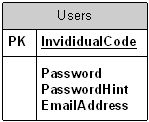
For more information on ORM visit <
http://www.orm.net/>
NUnit testing and toolsTesting should be a common task in any project. Testing during design and development can save much precious time during the official testing phase, especially because it will probably only point out bugs with it’s integration, and not simple algorithm or logic errors. Not having to go back to the “drawing board” when a bug is found is much easier if found in early phases.
For that reason, having a testing standard can go a long way into maintaining the project bug-free and compliant to the customer’s expectations.
A simple test should assert the results expected from the algorithm, method, class, and so forth. Creating a NUnit test is shown below:
using System;
using System.Collections.Generic;
using System.Text;
using NUnit.Framework;
using NUnit_Console_App_Test;

namespace NUnit
{
    [TestFixture]
    public class testClass
    {
        private Simple_Math math;
        [SetUp]
        public void Initialize()
        {
             math = new Simple_Math();
        }
        [TearDown]
        public void Dispose()
        {
            GC.Collect();
        }
        [Test]
        public void Add()
        {
            Assert.AreEqual(3, math.Add(1, 2));
        }
        [Test]
        public void Subtract()
        {
            Assert.AreEqual(-1, math.Subtract(1, 2));
        }
    }
}

The Simple_Math class is shown below:
using System;
using System.Collections.Generic;
using System.Text;

namespace NUnit_Console_App_Test
{
    public class Simple_Math
    {
        public Simple_Math() { }

        public int Add(int first, int second)
        {
            return first + second;
        }
        public int Subtract(int first, int second)
        {
            return first - second;
        }
    }
}
For more information on how to run NUnits, please visit <
http://www.nunit.org/>
Emulation of Production environmentOne of the best ways to forecast performance and hardware issues is by emulating the production environment in a testing environment. That means that a site will most definitely work properly in production if it works on a test server that behaves like a production server.
A test server can emulate the production server by creating a stressful hardware configuration. A stressful configuration is exactly the opposite in hardware as the production environment. Therefore, if the production environment has 4GB or RAM then the stressful test/production emulation will have only 512Mbs of RAM or less, will have a considerably smaller Hard drive, network bandwidth and any other hardware that is approximately ¼ of the production specification.
The rationale is that if the site can function properly or even acceptably in that stressful environment, then it will perform at same or better levels in the actual production environment.
Debugging and optimization of codeDebugging has much to do with NUnit testing, but it’s done during an official testing or debugging phase. Using additional tools for debugging can also help finding issues that only occur once the system is installed in the test environment. A tool that can be implemented into code and can output much technical information is
http://logging.apache.org/log4net/.
Optimizing the code can be accomplished by holding regular peer-reviews and even team reviews of source code. Having a senior programmer, or manager, or peers review helps point out flaws in the logic or process understanding, design, and even requirements. Normally, weekly reviews are most productive since they allow enough time for developers to work and then have enough to review or have reviewed. Nonetheless, review may also be held when a Milestone is achieved.
Stress testing and toolsAlthough stress testing may be related to emulating the production environment it differs in the sense that it tests each page, process, methods, services, etc. Having crawlers go through a web application for example allows for trying different combinations of ‘clicks’ and even processes. Other tools, such as tracers, page loading performance test, and so forth help manage a site after it is deployed and if it suffers any type of degradation.
Having the web application tested before is published can avoid user dissatisfaction and escalations in the long run.
ConclusionFollowing these set of standards may require some training and practice from agencies and developers. Nevertheless, most of the suggestions in this document are intended to create a leveled expectation from managers and agencies since both will know at least the basic steps for having a successful outcome for a project.
It’s found that, if managers are aware of the progress, and even problems of a project, that they will become more proactive in participating and acting towards a positive outcome. Therefore, documenting and reporting are essentials to any project.
Resources:
<
http://www.sparxsystems.com.au/> - UML Design Tool
<
http://alistair.cockburn.us/Use+cases> - Use Cases Documentation
<
http://www.agilemodeling.com/artifacts/useCaseDiagram.htm> - Graphic Use Cases
<
http://office.microsoft.com/en-us/visio/default.aspx> - Visio Tool
<
http://office.microsoft.com/en-us/project/default.aspx> - Project Tool
<
http://www.orm.net/> - Object-Role Modeling Database Design
<
http://www.testdriven.net/default.aspx> - NUnits Plug-in for Visual Studio
<
http://www.nunit.org/index.php> - NUnit (testing) Framework
<
http://www.siteloadtesting.com/> - Website performance test
<
http://www.stresstester.com/> - Website Stress test
<
http://logging.apache.org/log4net/> - Web Application Logging and Debugging plug-in
<
http://jcrawler.sourceforge.net/> - Website Crawler
<
http://www.softwareqatest.com/qatweb1.html> - List of Applications and sites for testing your application
<
http://www.gomez.com/info_center/instant-test.php> - website speed test