Having used MongoDb almost exclusively with the NoRM C# driver for several months
now, this is something that I have always wanted to do, just to satisfy my own
curiosity.
Michael Kennedy did a speed test like this but he used LINQ to SQL for the SQL Server
side, which to me is not quite as accurate as comparing "raw" to "raw"
performance. So I set up my own simple tests performing 1,000 inserts , 1,000
Selects, and 1,000 updates on both a SQL Server database and a MongoDb database.
LINQ to SQL and Entity Framework are not exactly speed champions, so by keeping
them out of the equation I believe we can get better data.
The object used was a simple Customer class that holds a nested List<Address>
property. Of course with MongoDb, you can persist the entire object as is and
the BSON serializer takes care of it; with SQL Server this requires a two-table
arrangement and SQL joins. I used stored procedures throughout on the SQL Server
side, and an array of pregenerated Guids for the primary keys in both cases.
Have a look at the results first, and then I'll get into the implementation details:
MongoDb / NoRM vs SQL Server Speed Tests
(3 test runs for each operation)
1000 INSERTS: Times in Milliseconds
Sql Server MongoDb
1217.00 203.00
1049.00 200.00
1080.00 207.00
AVERAGES 1115.33 203.33 5.49 Times Faster
1000 SELECTS by ID:
Sql Server MongoDb
832.00 1947.00
850.00 2028.00
855.00 2033.00
AVERAGES: 845.67 2002.67 0 .42 Times Faster
1000 Updates:
Sql Server MongoDb
1493.00 194.00
1355.00 186.00
1716.00 187.00
AVERAGES: 1521.33 189.00 8.05 Times Faster
That's right - in my tests, MongoDb was 5.49 times faster than SQL Server for inserts,
about half as fast on selects and about 8 times faster on updates. Now, being
a long time SQL Server guy, I am not about to give up my relational databases
any time soon. However, there are indeed a number of situations where MongoDb
(which is free, as in beer) is a good choice. Even if you are already using SQL
Server on your web site for example, it could be a wise decision to lighten the
load by having certain operations done under MongoDb.
NOTE: Thanks to an expert comment by a reader below, I redid my tests as I had left
the WHERE clause out of the select stored proc.
But when I switched the selects to a WHERE based on LastName, with appropriate indexes
on both SQL Server and MongoDb, MongoDb was then 1.29 times faster than SQL Server
on selects. I do not know if this is because MongoDb doesn't handle indexing
GUIDs well, or some other reason. It is a known fact that UNIQUIDENTIFIER primary
keys in SQL Server slow down the works - a Guid is 16 bytes, whereas int is 4
bytes wide and bigint is 8 bytes. However, an informal poll of developers reveals that people are using Guid primary keys with SQL Server by a factor of 4
to 1, so I believe this is a "real world" test scenario.
I have already run MongoDb with the NoRM driver and MonoDevelop with an ASP.NET project
on Ubuntu Linux - with almost no changes - so it's a very flexible arrangement.
Here is the model that I used:
public class Customer
{
[MongoIdentifier]
public Guid _Id { get; set; }
public string FirstName { get; set; }
public string LastName { get; set; }
public DateTime EntryDate { get; set; }
public string Email { get; set; }
public List<Address> Addresses { get; set; }
}
public class Address
{
public Guid CustomerId { get; set; }
public string Address1 { get; set; }
public string City { get; set; }
public string State { get; set; }
public string Zipcode { get; set; }
}
So for SQL Server, we need two tables - a Customer and an Address table. I also have
an Operations class that defines all the basic operations needed for the tests:
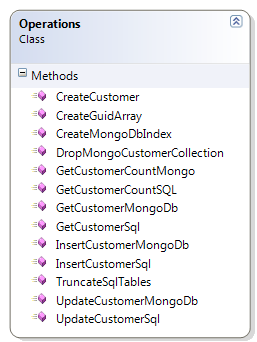
Then finally I have the main Program.cs class that does everything in order, including
cleanup of each database:
static void Main(string[] args)
{
Operations op9 = new Operations();
int mongoCount1 = op9.GetCustomerCountMongo();
int sqlCount1 = op9.GetCustomerCountSQL();
Console.WriteLine("There are " + sqlCount1.ToString() + " Sql rows and " + mongoCount1.ToString() + " mongodb documents.");
//Cleanup
op9.TruncateSqlTables();
op9.DropMongoCustomerCollection();
Guid[] gooids = op9.CreateGuidArray();
Stopwatch sw = new Stopwatch();
sw.Start();
//Sql Server Inserts
Operations op = new Operations();
for (int i = 0; i < 1000; i++)
{
string inc = i.ToString();
Customer c = op.CreateCustomer("Joe", "Blow" + inc, DateTime.Now, "Joe@blow.com", "123 High St #" + inc,
"Orlando", "FL", "32801", gooids[i]);
Guid j= op.InsertCustomerSql(c);
}
sw.Stop();
Console.WriteLine("SQL: " + sw.ElapsedMilliseconds.ToString());
sw.Reset();
Operations op2 = new Operations();
op2.CreateMongoDbIndex();
sw.Start();
//MongoDb Inserts
for (int i = 0; i < 1000; i++)
{
string inc = i.ToString();
Customer c = op2.CreateCustomer("Joe", "Blow" + inc, DateTime.Now, "Joe@blow.com", "123 High St #" + inc,
"Orlando", "FL", "32801", gooids[i] );
Guid j= op2.InsertCustomerMongoDb(c);
}
sw.Stop();
Console.Write("MongoDb: " + sw.ElapsedMilliseconds.ToString());
Console.WriteLine("");
sw.Reset();
sw.Start();
//SQL Server selects
Operations op3 = new Operations();
for (int i = 0; i < 1000; i++)
{
Customer c = op3.GetCustomerSql(gooids[i]);
}
sw.Stop();
Console.WriteLine("Get Customer SQL: " + sw.ElapsedMilliseconds.ToString( ));
sw.Reset();
sw.Start();
//MongoDb Selects
Operations op4 = new Operations();
for (int i = 0; i < 1000; i++)
{
Customer c = op4.GetCustomerMongoDb(gooids[i]);
}
sw.Stop();
Console.WriteLine("Get Customer MongoDb: " + sw.ElapsedMilliseconds.ToString( ));
sw.Reset();
sw.Start();
//SQL Server Updates
Operations op5 = new Operations();
for (int i = 0; i < 1000; i++)
{
string inc = i.ToString();
Customer c = op5.CreateCustomer("Joe", "Blow" + inc, DateTime.Now, "Joe@blow.com", "123 High St #" + inc,
"Orlando", "FL", "32801", gooids[i]);
op5.UpdateCustomerSql(c);
}
sw.Stop();
Console.WriteLine("SQL Updates: " + sw.ElapsedMilliseconds.ToString());
sw.Reset();
sw.Start();
//MongoDb Updates
Operations op6 = new Operations();
for (int i = 0; i < 1000; i++)
{
string inc = i.ToString();
Customer c = op6.CreateCustomer("Joe", "Blow" + inc, DateTime.Now, "Joe@blow.com", "123 High St #" + inc,
"Orlando", "FL", "32801", gooids[i]);
op6.UpdateCustomerMongoDb(c);
}
sw.Stop();
Console.Write("MongoDb Updates: " + sw.ElapsedMilliseconds.ToString());
Console.WriteLine("");
int mongoCount = op.GetCustomerCountMongo();
int sqlCount = op.GetCustomerCountSQL();
Console.WriteLine("There are " +sqlCount.ToString( ) + " Sql rows and " +mongoCount.ToString( ) + " mongodb documents.");
Console.WriteLine("Done. Any key to quit.");
Console.ReadLine();
}
NOTE: In response to some comments below, I redid all the tests using an integer
primary key on both the MongoDb and the SQL Server tables. All stored procs,
indexes to match, and code was updated to enable this change. Here are the results:
MongoDb / NoRM vs SQL Server Speed Tests - Integer Keys
(3 test runs for each operation)
1000 INSERTS: Times in Milliseconds
Sql Server MongoDb
882.00 203.00
1216.00 242.00
938.00 209.00
AVERAGES 1012.00 218.00 4.64 Times Faster
1000 SELECTS by Integer ID:
Sql Server MongoDb
819.00 1372.00
940.00 1342.00
868.00 1327.00
AVERAGES: 875.67 1347 .65 Times Faster
1000 Updates:
Sql Server MongoDb
1377.00 183.00
1565.00 248.00
1398.00 191.00
AVERAGES: 1446.67 207.33 6.98 Times Faster
As can be seen, MongoDb handled inserts nearly 5 times faster, Selects only about
65% as fast, and updates almost 7 times faster than SQL Server. When I changed the Selects to a Where clause of "LastName" MongoDb performance increased to 91% of SQL Server performance. Both databases had the LastName field indexed.
In all cases, I only added one Address to each Customer in order to keep things simpler
on the SQL Server side.
You can download the sample test app source code, which includes a SQL Script to set up the SQL Server database here. The script assumes you have a folder C:\databases where the files will be created.
Conclusion: With the exception of some issues around indexing Guids and selects, MongoDb with
the NoRM driver is a real speed champion over SQL Server for basic inserts, selects
and updates.
When you run this (with whatever changes suit your needs) I recommend that you do
a Release Build and run it outside of the Visual Studio hosting environment to
get "clean" statistics. NOTE: I have made one minor change to the NoRM
library: GetCollectionName was changed to public to allow it to be called from
outside the NoRM library.
Of course you'll need a handy SQL Server instance (SQLExpress will do) as well as
a fully installed instance of MongoDb. For instructions on installing MongoDB
and NoRM, see this article.