Let’s say for an example, we are showing news on our News.aspx page in our site.
The data for news will be inserted from admin section. Now for news we will mostly
go by date sort order. We will be showing the latest at top or something like
that. In this order, we will be for order by date (asc or desc). But now, we
have 2 news items on same date. And we want them in sequence order (not by asc
or desc), so what we will do!!
To solve this issue, I have worked out for display order method. Add a new field
called DisplayOrder to your database table with the datatype INT. (NOT NULL)
Let’s take an example. I have several news categories and each category can have
multiple news items.
Now I want them sorted by category, so I will write following query to insert the
data.
Here we are inserting displayorder field by getting the maximum of it by categoryId,
and ading one for the next record. So every time when we wil insert the new record,
it will work like auto-increment field.
Insert Query:
DECLARE @DisplayOrder INT
SELECT @DisplayOrder = ISNULL(MAX(DisplayOrder),0) FROM News WHERE CategoryId = @CategoryId
SET @DisplayOrder = @DisplayOrder + 1
INSERT INTO News (News_Title, News_Description, Image, Active, CategoryId, DisplayOrder)
VALUES (@News_Title, @News_Description, @Image, @Active, @CategoryId, @DisplayOrder)
Now at the time of retrieving the list we need to write the query so that we get
the display order. But it may happen that we delete some record so display order
will not be in sequence. So for that we need to write the query so that we will
get another column name SerialNo (or just SrNo). And our query will be like this.
In the following query, we are making use of Row_Number() furnction over the displayorder
column. This function will give us a new collumn called "SrNo" by generation
a Searial order on DisplayOrder column. (i.e, 1, 2, 3, 4, 5, ... etc)
Select Query:
SELECT *, Row_Number()(over order by [DisplayOrder]) AS SrNo FROM News WHERE CategoryId = @CategoryId
Now to show images for up/down in repeater you have to write following lines
<asp:ImageButton ID="imgbtnUP" CausesValidation="false" CommandName="Up"
CssClass='<%#Convert.ToInt64(Eval("DisplayOrder"))==1?"invisible":""%>'
CommandArgument='<%# Eval("CategoryId") + "," + Eval("DisplayOrder")
%>' OnCommand="imgbtn_onClick"
ImageUrl="~/Images/arrow-up_blue.png" runat="server" />
<asp:ImageButton ID="imgbtnDown" CommandName="Down" CssClass='<%#
Convert.ToInt64(Eval("SrNo"))==Convert.ToInt64(ViewState["rowcount"])?"hide":""%>'
CommandArgument='<%# Eval("CategoryId ") + "," + Eval("DisplayOrder")
%>' OnCommand="imgbtn_onClick"
ImageUrl="~/Images/arrow-down_blue.png" runat="server" />
So now your repeater or gridview will look something like this
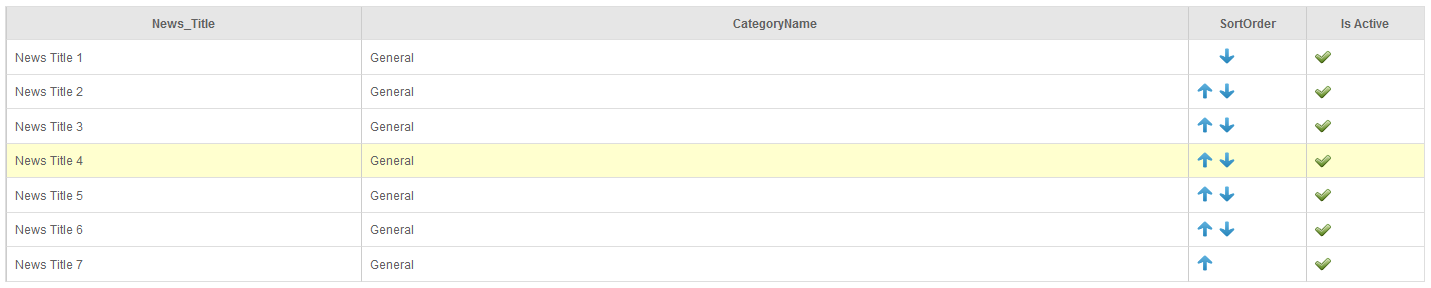
Remember, if you are using table structure for repeater then add the above code code
in <td></td> and if you are using gridview or datagrid, then add
these line in template column. Now you have to write the code to handle the event
on click of up or down arrow, and here is the code for that.
Now in the following function we are passing the parameters to the class method to
move the record upwards or downwards.
protected void imgbtn_onClick(object sender, CommandEventArgs e)
{
if (e.CommandArgument != null)
{
string[] str;
str = e.CommandArgument.ToString().Split(',');
if (e.CommandName.ToUpper() == "UP")
Class_News.OrderChange((decimal)Convert.ToDecimal(str[0]), (int)Convert.ToInt64(str[1]), true);
else
Class_News.OrderChange((decimal)Convert.ToDecimal(str[0]), (int)Convert.ToInt64(str[1]), false);
Load_News();
}
}
In above code, “Class_News” is the class name from where you are accessing your data
related functions like Insert, update, delete etc. Now what to write in “OrderChange”
function!! So let’s see the logic for it.
Here is the code for “OrderChange” function in your Data Access Layer class:
public static bool OrderChange(SqlConnection _connection, SqlTransaction _transaction, decimal
pIdSpecial, int pSN, bool pOrderUp)
{
SqlCommand command = new SqlCommand("dbo.NewsOrderChange", _connection, _transaction);
command.CommandType = CommandType.StoredProcedure;
bool result = false;
DataAccessHelper.AddParam(command, "CategoryId", SqlDbType.Decimal, pIdSpecial, ParameterDirection.Input);
if (pOrderUp)
{
DataAccessHelper.AddParam(command, "pOrderUp", SqlDbType.Int, 1, ParameterDirection.Input);
}
else
{
DataAccessHelper.AddParam(command, "pOrderUp", SqlDbType.Int, 0, ParameterDirection.Input);
}
DataAccessHelper.AddParam(command, "pSN", SqlDbType.Int, pSN, ParameterDirection.Input);
result = Convert.ToBoolean(command.ExecuteNonQuery());
return result;
}
So, this is the code for “OrderChange” function in data access layer. Here we have
to pass three parameters - CategoryId, pOrderUp(to get whether it is up or down)
and pSn is for serial number. And now the main part of the application, the Orderchange
stored procedure which is “NewsOrderChange” in our case.
Here is the stored procedure for that.
Stored Procedure :
CREATE PROCEDURE [dbo].[NewsOrderChange]
@CategoryId numeric(18,0),
@pOrderUp int,
@pSN int
AS
BEGIN
IF @pOrderUp=1
BEGIN
UPDATE News SET [DisplayOrder]=-1 WHERE [DisplayOrder]=@pSN AND CategoryId=@CategoryId
UPDATE News SET [DisplayOrder]=@pSN WHERE [DisplayOrder]=@pSN - 1 AND CategoryId=@CategoryId
UPDATE News SET [DisplayOrder]=@pSN - 1 WHERE [DisplayOrder]=-1 AND CategoryId=@CategoryId
END
ELSE
BEGIN
UPDATE News SET [DisplayOrder]=-1 WHERE [DisplayOrder]=@pSN AND CategoryId=@CategoryId
UPDATE News SET [DisplayOrder]=@pSN WHERE [DisplayOrder]=@pSN + 1 AND CategoryId=@CategoryId
UPDATE News SET [DisplayOrder]=@pSN+1 WHERE [DisplayOrder]= -1 AND CategoryId=@CategoryId
END
END
This stored procedure changes three records at a time to move a single record upwards
or downwards and sets the order of each record accordingly.
You can download the sample application code here : Download