But search as I might, I could not find any examples of T4 templates that take this
approach. However, I did find a fledgling utilty that used a StringBuilder to
loop over a DataTable and build a POCO class from it. This gave me enough ideas
to build what I needed.
What my utility does is to take a connection string and a stored procedure name that
you supply. It then uses the SqlCommandBuilder DeriveParameters method to dynamically
create a series of labels and textboxes containing the SQLParameter names and
datatypes. You enter the parameter values you want, press the button, and off
we go.
If your sproc returns 5 resultsets, you'll get 5 POCO classes written to the
C:\Temp folder.
At that point, all you need to do is modify the stock namespace and class names,
and you're "good to go".
Let's have a look at the code I put together and see how this works:
using System;
using System.Collections.Generic;
using System.ComponentModel;
using System.Data;
using System.Drawing;
using System.Linq;
using System.Text;
using System.Windows.Forms;
using System.Threading;
using System.Reflection;
using System.Reflection.Emit;
using System.IO;
using System.Runtime.CompilerServices;
using System.Data.SqlClient;
namespace database.properties
{
public partial class Form1 : Form
{
public string filePath = @"C:\Temp";
private static string sprocName = "";
public Form1()
{
InitializeComponent();
}
private void Form1_Load(object sender, EventArgs e)
{
}
public void DoWork()
{
string fileText = null;
DataSet ds = GetDataSet();
foreach (DataTable DTable in ds.Tables)
{
string classFilePath = Path.Combine(filePath, string.Format("{0}{1}", DTable.TableName, ".cs"));
fileText = GetTableType(DTable).ToString();
using (StreamWriter outfile =
new StreamWriter(classFilePath))
{
outfile.Write(fileText.ToString());
}
}
label3.Text = "OPERATION COMPLETED.";
}
public static StringBuilder GetTableType(DataTable DTable)
{
StringBuilder sb = new StringBuilder();
sb.Append("namespace MyNameSpace");
sb.Append("\n {");
sb.Append("\n");
sb.Append(string.Format("public class {0} ", DTable.TableName));
sb.Append("\n {");
foreach (DataColumn col in DTable.Columns)
{
var PropertyName = col.ColumnName;
string propertyVariable = string.Format("_{0}", PropertyName).ToLower();
string PropertyType = col.DataType.FullName.ToString();
PropertyType = ConvertSqlDatatype(PropertyType.Remove(0, 7));
sb.Append("\n");
sb.Append(string.Format("private {0} {1};", PropertyType, propertyVariable));
}
foreach (DataColumn col in DTable.Columns)
{
var PropertyName = col.ColumnName;
string propertyVariable = string.Format("_{0}", PropertyName).ToLower();
string PropertyType = col.DataType.FullName.ToString();
PropertyType = ConvertSqlDatatype(PropertyType.Remove(0, 7));
sb.Append("\n");
sb.Append(string.Format("public {0} {1}", PropertyType, PropertyName.ToString()));
sb.Append("\n {");
sb.Append(string.Format(" get {0} return {1}; {2}", "{", propertyVariable, "}"));
sb.Append("\n");
sb.Append(string.Format("set {0} {1} = value; {2}", "{", propertyVariable, "}"));
sb.Append("\n }");
}
sb.Append("\n }");
sb.Append("\n }");
return sb;
}
DataSet GetDataSet()
{
string cnString = this.txtConn.Text;
SqlCommand cmd = new SqlCommand(sprocName , new SqlConnection(cnString));
cmd.CommandType = CommandType.StoredProcedure;
foreach ( Control c in panel1.Controls)
{
if (c is TextBox)
{
var k = c.Tag.ToString().ToLower();
if(k=="int")
{
int val = int.Parse(c.Text);
cmd.Parameters.AddWithValue(c.Name, val);
}
if(k=="varchar" || k=="nvarchar")
cmd.Parameters.AddWithValue(c.Name, c.Text);
if (k == "float")
cmd.Parameters.AddWithValue(c.Name, float.Parse(c.Text));
if (k == "datetime")
cmd.Parameters.AddWithValue(c.Name, DateTime.Parse(c.Text));
if (k == "uniqueidentifier")
cmd.Parameters.AddWithValue(c.Name, Guid.Parse(c.Text));
if (k == "bit")
cmd.Parameters.AddWithValue(c.Name, Convert.ToBoolean(c.Text));
// Note - I've only done some of the most common parameter types - fill in more
as you need them, the same way.
}
}
SqlDataAdapter da = new SqlDataAdapter(cmd);
DataSet ds = new DataSet();
da.Fill(ds);
return ds;
}
public static string ConvertSqlDatatype(string dataType)
{
switch (dataType.ToLower())
{
case "string": return "string";
case "bigint": return "long";
case "binary": return "byte[]";
case "bit": return "bool";
case "char": return "char";
case "date": return "DateTime";
case "datetime": return "DateTime";
case "datetime2": return "DateTime";
case "datetimeoffset": return "DateTimeOffset";
case "decimal": return "decimal";
case "float": return "float";
case "image": return "byte[]";
case "int": return "int";
case "money": return "decimal";
case "nchar": return "char";
case "ntext": return "string";
case "numeric": return "decimal";
case "nvarchar": return "string";
case "real": return "double";
case "smalldatetime": return "DateTime";
case "smallint": return "short";
case "smallmoney": return "decimal";
case "text": return "string";
case "time": return "TimeSpan";
case "timestamp": return "DateTime";
case "tinyint": return "byte";
case "uniqueidentifier": return "Guid";
case "varbinary": return "byte[]";
case "varchar": return "string";
default:
return "string";
}
}
private void button2_Click(object sender, EventArgs e)
{
// create classes
DoWork();
}
private void button1_Click(object sender, EventArgs e)
{
string cnString = txtConn.Text;
string sproc = txtSproc.Text;
SqlCommand cmd = new SqlCommand( sproc, new SqlConnection(cnString));
cmd.Connection.Open();
cmd.CommandType = CommandType.StoredProcedure;
SqlCommandBuilder.DeriveParameters(cmd);
int loc1 = 0;
int loc2 = 0;
foreach (SqlParameter parameter in cmd.Parameters)
{
if (parameter.ParameterName != "@RETURN_VALUE")
{
TextBox tb = new TextBox();
tb.Name = parameter.ParameterName;
tb.Width = 150;
tb.Height = 25;
tb.Tag = parameter.SqlDbType;
tb.Location = new Point(loc1 + 150, loc2);
System.Windows.Forms.Label lbl = new System.Windows.Forms.Label();
lbl.Name = "lbl" + parameter.ParameterName;
lbl.Text = parameter.ParameterName;
lbl.Width = 150;
lbl.Height = 25;
lbl.Location = new Point(loc1, loc2);
panel1.Controls.Add(lbl);
panel1.Controls.Add(tb);
loc2 += 25;
}
}
panel1.Visible = true;
Application.DoEvents();
cmd.Connection.Close();
sprocName = txtSproc.Text;
this.button2.Enabled = true;
}
}
}
The "button1_Click" handler is where everything starts. We create a SqlCommand,
open our connection, and pass the command into the SqlCommandBuilder's DeriveParameters
method. The command now has populated parameters. Then we simply iterate over
the SqlParameters collection, creating a TextBox and a Label for each one, and
adding these to the Panel in the lower half of the Form. The user gets to see
a label and a textbox for each SqlParameter, and they can then fill in the desired
values. At this point, I enable the final button.
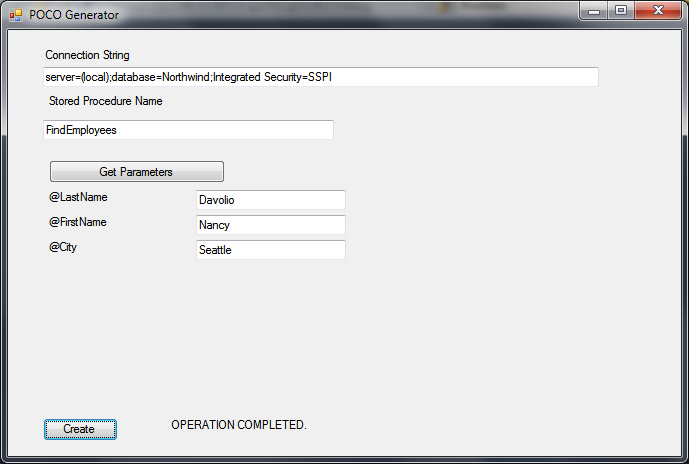
When you click the "Create" button, we call the DoWork() method which uses
the GetTableType method to build a class. The SqlDatatypes are converted to .NET
types via the ConvertSqlDataType lookup method. The classes, named Table.cs,
Table1.cs, etc. are all written to the C:\temp folder.
NOTE: As pointed out by Robbe in the comments below, there are some SQL datatypes
that cannot be easily represented by textbox values. Timestamp (now "rowversion")
is one of them, being a .NET type of Byte[]. This is a self-incrementing column
value that would rarely be used as a stored procedure input parameter. Other
types would be varbinary, etc. These are minor limitations of the POCO Generation
concept, but developers should still be aware of them.
I have included a sample stored proc "FindEmployees" for the popular Northwind
database that you can use to test this out.
You can download the Visual Studio 2010 solution here.