|
We needed a way to handle accountholder signature images
to be transported in XML in such a way that the image of the person's
signature (or really, any binary data) could be transported in the same
XML text stream as the other account information in such a way that it
wouldn't choke our COM components that process these XML streams, and
the processed results to be displayed via CLIENT SIDE script in a web
page. This technique can be used to populate formfields in a document
for printing, or anywhere we need to display the results of an XSLT transform
whose source document includes a specific image that came out of a database
field.
My first inclination, since I had already had some experience
with encoding images and byte arrays into UNICODE text streams, was to
perform such a conversion and place the data into a CDATA section for
transmission over the wire. However, after doing a little reading ( I
like to study, 30 minutes of learning can save you 20 hours of toil down
the road), I realized that there is a much easier way.
The MSXML 3.0 and later parsers support an element dataType
property as well as a nodeTypedValue property. Among the choices
are bin.hex and bin.base64. For anyone familiar with MIME
types, both of these are widely used in HTTP protocol to transmit binary
data encoded as streams of characters. You are probably most familiar
with these industry standard methods as they are the primary means of
transmitting email attachments in a way that any email client can handle.
The way these properties are used is extremely simple.
If you are building an XML document from say, data that comes out of a
database query, then when you add the element containing the binary data
you would simply call:
Set oElement = xmlDoc.createElement("SIGNATURE")

        oRoot.appendChild oElement

        oElement.dataType = "bin.base64"

        oElement.nodeTypedValue = rs.Fields("Signature").Value
Folks, it just doesn't get any easier that this! Now
that you have the general concept, let's put this into a simplified but
"real world" example that you can use as a model or starting
point to solve similar programming problems of your own. What we'll do
is take an Acess 97 database with some "account" information
that includes a field holding a Jpeg image of the customer's signature.
I've put this in Access for portability and it's included in the ZIP file
of download material at the bottom of this article, so you should be able
to run this example right "out of the box".
First, let's take a quick look at the structure of our
database table:
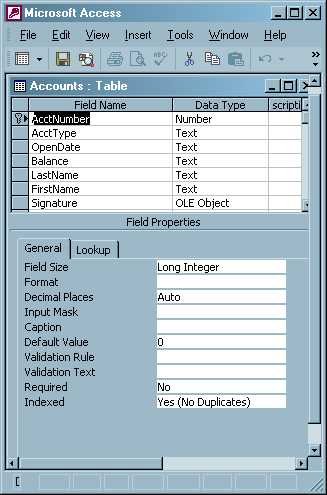
As you can see, it has a number field for
the account number, a bunch of text fields for the various items that
might go with an account, and an OLE Object field to hold the JPEG signature
images. In SQL Server, this would be a field of type IMAGE - the concept
is exactly the same.
Now let's take a look at the ASP page that
receives our desired account number, retrieves the record holding that
person's data, and creates the XML Document that is subsequently streamed
to the client:
<%
' Page getAcctDetails.asp

        ' we are going to stream XML so let's set our buffering
        on and our Content Type right at the start...

        Response.Buffer = TRUE

        Response.ContentType = "text/xml"

        ' Let's get the account number they want off the
        querystring ...

        Dim conn, rs, xmlDoc, oRoot, oMainElement, oElement

        sAccountNumber = Request.QueryString("AcctNo")

        if sAccountNumber = "" then

        ' if they forgot, well this is just an example so
        we'll help them out ...

        sAccountNumber = 1234

        end if

        ' Now let's get the data ...

        Set conn = Server.CreateObject("ADODB.Connection")

        connstr = "Provider=Microsoft.Jet.OLEDB.4.0;Data Source=" &
        server.mappath(".") & "\bank.mdb" & ";"

        conn.Open connstr

        strSQL = "select * from Accounts where AcctNumber = " &
        sAccountNumber

        Set rs = conn.Execute(strSQL)

        ' We need an XML Document object ....

        Set xmlDoc = Server.CreateObject("MSXML2.DOMDocument.3.0")

        ' create an empty xml document to start with...

        xmlDoc.loadXML "<?version=""1.0""?"">"

        Set oRoot = xmlDoc.createElement("ACCOUNT")

        Set xmlDoc.documentElement = oRoot

        ' Now we construct our XML Document with .dataType
        and .nodeTypedValue properties included...

        if not rs.EOF then

        Set oElement = xmlDoc.createElement("ACCTNUMBER")

        oRoot.appendChild oElement

        oElement.dataType = "i2"
oElement.nodeTypedValue = FixXMLChars(rs.Fields("ACCTNumber").Value)
 Set oElement = xmlDoc.createElement("ACCTTYPE")

        oRoot.appendChild oElement

        oElement.dataType = "string"

        oElement.nodeTypedValue = FixXMLChars(rs.Fields("AcctType").Value)


        Set oElement = xmlDoc.createElement("OPENDATE")

        oRoot.appendChild oElement

        oElement.dataType = "string"

        oElement.nodeTypedValue = FixXMLChars(rs.Fields("OpenDate").Value)
 Set oElement = xmlDoc.createElement("BALANCE")

        oRoot.appendChild oElement

        oElement.dataType = "string"

        oElement.nodeTypedValue = FixXMLChars(rs.Fields("Balance").Value)
 Set oMainElement =
        xmlDoc.createElement("ACCOUNTHOLDER")

        oRoot.appendChild oMainElement
 Set oElement = xmlDoc.createElement("LASTNAME")

        oMainElement.appendChild oElement

        oElement.dataType = "string"

        oElement.nodeTypedValue = FixXMLChars(rs.Fields("LastName").Value)
 Set oElement = xmlDoc.createElement("FIRSTNAME")

        oMainElement.appendChild oElement

        oElement.dataType = "string"

        oElement.nodeTypedValue = FixXMLChars(rs.Fields("FirstName").Value)
 Set oElement = xmlDoc.createElement("SIGNATURE")

        oRoot.appendChild oElement

        oElement.dataType = "bin.base64"

        oElement.nodeTypedValue = rs.Fields("Signature").Value


        else

        Set oElement = xmlDoc.createElement("ERROR")

        oRoot.appendChild oElement

        oElement.dataType = "string"

        oElement.nodeTypedValue = FixXMLChars("Account number [" &
        sAccountNumber & "] not found.")
 end if

        ' OK now we can stream it all outr to the Response object...

        Response.Write "<?xml version=""1.0""?>"

        Response.Write xmlDoc.XML


        rs.Close

        conn.Close


        Set rs = nothing

        Set conn = nothing

        Set xmlDoc = nothing

        Response.flush
'
        These are just utility functions to clean up any illegal charaters to
        their correct entity references...

        Function FixXMLChars(ByVal strSource)

        lngPointer1 = InStr(strSource, "&")

        lngPointer2 = InStr(strSource, "<")

        lngPointer3 = InStr(strSource, ">")

        lngPointer4 = InStr(strSource, """")

        lngPointer5 = InStr(strSource, "'")

        If lngPointer1 = 0 And lngPointer2 = 0 And lngPointer3 = 0 And lngPointer4
        = 0 And lngPointer5 = 0 Then

        FixXMLChars = strSource

        Else

        strNew = FixXMLChar(strSource, "&", "&")

        strNew = FixXMLChar(strNew, "<", "<")

        strNew = FixXMLChar(strNew, ">", ">")

        strNew = FixXMLChar(strNew, """", """)

        strNew = FixXMLChar(strNew, "'", "'")

        FixXMLChars = strNew

        End If

        End Function
Function FixXMLChar(ByVal
        strSource, ByVal strSearchTerm , ByVal strReplaceTerm )

        lngPointer = InStr(strSource, strSearchTerm)

        If lngPointer = 0 Then

        FixXMLChar = strSource

        Else

        strValidString = ""

        While Not lngPointer = 0

        strValidString = strValidString & Mid(strSource, 1, lngPointer - 1)
        & strReplaceTerm

        strSource = Mid(strSource, lngPointer + 1)

        lngPointer = InStr(strSource, strSearchTerm)

        Wend

        strValidString = strValidString & strSource

        FixXMLChar = strValidString

        End If

        End Function

        %>
OK. if your IIS folder is set to "C:\inetpub\wwwroot\pictures"
and all this stuff is in there, and the permissions are set to allow read/write
(cause Access like to create .ldb files and if it can't write you won't
get very far) then when you load this page with "http://localhost/pictures/getAcctDetails.asp"
you should see a nice XML document in your browser with all the elements
ncluding a "Signature" element containing the ENCODED binary
stream of your JPEG!
Well, we are 90% there so bear with me as
we switch to the client side HTM page that's requesting our data:
<Script
        language=VBScript >
'
        Request and retrieve our XML using XMLHTTP

        dim xmlhttp

        set xmlhttp =createobject("MSXML2.XMLHTTP.3.0")

        xmlhttp.Open "GET", "http://localhost/pictures/getAcctDetails.asp?Acctno=1234",false

        xmlhttp.Send()

        dim xmlDoc

        set xmlDoc =CreateObject("MSXML2.DOMDocument.3.0")

        xmlDoc.async=False

        xmlDoc.load xmlhttp.responseXML
'
        Let's create our Signature file first so we don't forget. The rest after
        that is easy.

        Set oNode = xmlDoc.selectSingleNode("ACCOUNT/SIGNATURE")
'
        Note we need to convert the Byte Array data back to a String


        btArr = RSBinaryToString(oNode.nodeTypedValue)

        Set fstemp = CreateObject("Scripting.FileSystemObject")

        Set filetemp = fstemp.CreateTextFile("C:\Signature.jpg", true)

        filetemp.write( btArr)

        filetemp.Close
' OK,
        let's just write out the rest of our elements:
document.write
        "NUMBER: " & xmlDoc.selectSingleNode("ACCOUNT/ACCTNUMBER").text
        & "<BR>"

        document.write "TYPE: " & xmlDoc.selectSingleNode("ACCOUNT/ACCTTYPE").text
        & "<BR>"

        document.write "OPEN DATE: " & xmlDoc.selectSingleNode("ACCOUNT/OPENDATE").text
        & "<BR>"

        document.write "BALANCE: " & xmlDoc.selectSingleNode("ACCOUNT/BALANCE").text
        & "<BR>"

        document.write "ACCOUNTHOLDER: " & xmlDoc.selectSingleNode("ACCOUNT/ACCOUNTHOLDER/LASTNAME").text
        & ", " & xmlDoc.selectSingleNode("ACCOUNT/ACCOUNTHOLDER/FIRSTNAME").text
        & "<BR>"
' ... and display our
        signature JPEG ...
        document.write "<img src=c:\Signature.jpg>"

        document.write "<input type=button id=showxml value=""show
        xml"" onclick=""VBSCRIPT:msgbox xmlhttp.responsexml.xml"">"
'
        These two optimized Binary to string functions came from Antonin Foller
        @ PStruh - they can handle large files and are

        ' WAY faster than crummy interpreted VBScript functions:

        Function RSBinaryToString(xBinary)

        Dim Binary

        If VarType(xBinary)=8 Then Binary = MultiByteToBinary(xBinary) Else Binary
        = xBinary

        Dim RS, LBinary

        Const adLongVarChar = 201

        Set RS = CreateObject("ADODB.Recordset")

        LBinary = LenB(Binary)

        If LBinary>0 Then

        RS.Fields.Append "mBinary", adLongVarChar, LBinary

        RS.Open

        RS.AddNew

        RS("mBinary").AppendChunk Binary

        RS.Update

        RSBinaryToString = RS("mBinary")

        Set RS=Nothing

        Else

        RSBinaryToString = ""

        End If

        Set RS=Nothing

        End Function


        Function MultiByteToBinary(MultiByte)

        Dim RS, LMultiByte, Binary

        Const adLongVarBinary = 205

        Set RS = CreateObject("ADODB.Recordset")

        LMultiByte = LenB(MultiByte)

        If LMultiByte>0 Then

        RS.Fields.Append "mBinary", adLongVarBinary, LMultiByte

        RS.Open

        RS.AddNew

        RS("mBinary").AppendChunk MultiByte & ChrB(0)

        RS.Update

        Binary = RS("mBinary").GetChunk(LMultiByte)

        End If

        Set RS = Nothing

        MultiByteToBinary = Binary

        End Function

        </script>
Your
        client - side display will look like this:
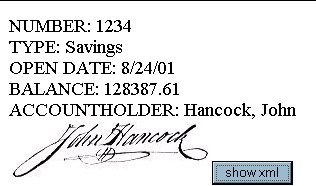
And that's it. You can click the "show
xml" button to display the actual XML that your display came from
(not here- the above is just an image of what you'll see when you run
the sample). This concept can be used in a multitude of ways. I hope it
proves as useful to you as it has for me. By the way, if anybody can come
up with a way to convert the JPEG data into an image that can be displayed
using client-side script out of memory without first saving it to a file
and displaying via a dynamically written IMG tag, feel free to post your
solution on one of our forums for all to see.
Download
the code that accompanies this article
Peter Bromberg is an independent consultant specializing in distributed .NET solutionsa Senior Programmer
/Analyst at in Orlando and a co-developer of the NullSkull.com
developer website. He can be reached at info@eggheadcafe.com
|