|
One of the most common needs we have as ASP.NET developers is to put
DropDown listboxes on forms. Listboxes of States, Countries, product
types, you name it. Wouldn't it be nice if you could keep all the items
in a
single database table and re-use the same table for all the listboxes
and dropdown
lists in your application? How about if you could set the properties
that determined
the SQL statement that selected your items out of this table, just as
you would any other property of the control? And while we're at it, how
about if once we get the list, let's have the control go ahead and cache
it since we really want to avoid requesting all the data from the database
over and over again every time the control is rendered on a page. That's
what my "DbListBox" DropDownList does. You can even set the "first field"
with a message such as "Please Select" so that every real item in the
listbox will fire the SelectedIndexChanged event. And best of all, it
uses OleDb so you can use it with virtually any data source, including
MSAccess.
This control's code is much like any other ServerControl; we start out
by "not reinventing the wheel" - since it's basically a DropDownList,
we have the class inherit from this as a base class:
Imports System
Imports System.Data
Imports System.Data.OleDb
Imports System.Web.UI
Imports System.Web.UI.WebControls
Imports System.Diagnostics
Imports System.ComponentModel
Namespace PAB.WebControls
    <DefaultProperty("TableName"), ToolboxData("<{0}:DbListBox runat=server></{0}:DbListBox>")> _
    Public Class DbListBox
        Inherits System.Web.UI.WebControls.DropDownList
        Private dt As New DataTable
        Private pTableName As String
        Private pDisplayColumn As String
        Private pValueColumn As String
        Private pFirstField As Boolean = False
        Private pFfirstFieldText As String = ""
        Private pConnectionString As String = ""
        Private pCacheId As String = ""
        Private pWhereClause As String = ""
        <Bindable(True), Category("Appearance"), DefaultValue(""), Browsable(True)> _
        Public Property TableName() As String
            Get
                Return pTableName
            End Get
            Set(ByVal Value As String)
                pTableName = Value
            End Set
        End Property
        Public Property ConnectionString() As String
            Get
                Return pConnectionString
            End Get
            Set(ByVal Value As String)
                pConnectionString = Value
            End Set
        End Property
        <Bindable(True), Category("Appearance"), DefaultValue(""), Browsable(True)> _
               Public Property DisplayColumn() As String
            Get
                Return pDisplayColumn
            End Get
            Set(ByVal Value As String)
                pDisplayColumn = Value
            End Set
        End Property
        <Bindable(True), Category("Appearance"), DefaultValue(""), Browsable(True)> _
         Public Property ValueColumn() As String
            Get
                Return pValueColumn
            End Get
            Set(ByVal Value As String)
                pValueColumn = Value
            End Set
        End Property
        <Bindable(True), Category("Appearance"), DefaultValue("dbListBox"), Browsable(True)> _
 Public Property CacheId() As String
            Get
                Return pCacheId
            End Get
            Set(ByVal Value As String)
                pCacheId = Value
            End Set
        End Property
        <Bindable(True), Category("Appearance"), DefaultValue(""), Browsable(True)> _
               Public Property FirstField() As Boolean
            Get
                Return pFirstField
            End Get
            Set(ByVal Value As Boolean)
                pFirstField = Value
            End Set
        End Property
        <Bindable(True), Category("Appearance"), DefaultValue(""), Browsable(True)> _
               Public Property FirstFieldText() As String
            Get
                If Nothing = Me.pFfirstFieldText Then
                    Me.pFfirstFieldText = ""
                End If
                Return pFfirstFieldText
            End Get
            Set(ByVal Value As String)
                pFfirstFieldText = Value
            End Set
        End Property
        <Bindable(True), Category("Appearance"), DefaultValue(""), Browsable(False)> _
         Public Overrides Property DataSource() As Object
            Get
                Return MyBase.DataSource
            End Get
            Set(ByVal Value As Object)
            End Set
        End Property
        <Bindable(True), Category("Appearance"), DefaultValue(""), Browsable(False)> _
        Public Overrides Property DataTextField() As String
            Get
                Return MyBase.DataTextField
            End Get
            Set(ByVal Value As String)
            End Set
        End Property
        <Bindable(True), Category("Appearance"), DefaultValue(""), Browsable(False)> _
        Public Overrides Property DataValueField() As String
            Get
                Return MyBase.DataValueField
            End Get
            Set(ByVal Value As String)
            End Set
        End Property
        <Bindable(True), Category("Appearance"), DefaultValue(""), Browsable(False)> _
        Public Overrides Property DataMember() As String
            Get
                Return MyBase.DataMember
            End Get
            Set(ByVal Value As String)
            End Set
        End Property
        <Bindable(True), Category("Appearance"), DefaultValue(""), Browsable(True)> _
        Public Property WhereClause() As String
            Get
                Return pWhereClause
            End Get
            Set(ByVal Value As String)
                pWhereClause = Value
            End Set
        End Property
        Public Sub New()
        End Sub
        Private Sub LoadListItems()
            Try
                Try
                    dt = DirectCast(System.Web.HttpContext.Current.Cache("listBox"), DataTable)
                Catch
                End Try
                If dt Is Nothing Then
                    Dim strQry As String = "SELECT " & Me.ValueColumn & " AS VALUE_FIELD, " & _
                         Me.DisplayColumn & " AS DISPLAY_FIELD FROM " & Me.TableName & " "
                    If Me.WhereClause <> "" Then
                        strQry += Me.WhereClause
                    End If
                    strQry += " ORDER BY " & Me.DisplayColumn
                    Dim cn As New OleDbConnection(Me.ConnectionString)
                    cn.Open()
                    Dim cmd As New OleDbCommand(strQry, cn)
                    Dim da As New OleDbDataAdapter(cmd)
                    dt = New DataTable
                    da.Fill(dt)
                    cn.Close()
                    cmd.Dispose()
                    System.Web.HttpContext.Current.Cache(Me.CacheId) = dt
                End If
                Dim dt2 As DataTable = dt.Copy()
                dt2.TableName = Me.TableName
                Dim i As Integer
                For i = 0 To dt2.Rows.Count - 1
                    Me.Items.Add(New ListItem(dt.Rows(i)("DISPLAY_FIELD").ToString(), _
                        dt.Rows(i)("VALUE_FIELD").ToString()))
                Next i
                If Me.FirstField Then
                    If Me.Items(0).Text <> "" Then
                        Me.Items.Insert(0, New ListItem(Me.FirstFieldText, ""))
                    End If
                End If
            Catch ex As Exception
               Throw
            End Try
        End Sub
        Protected Overrides Function SaveViewState() As Object
            Dim objItems(Me.Items.Count + 1) As Object
            Try
                If Not Page.IsPostBack Then
                    Me.LoadListItems()
                End If
                Dim baseState As Object = MyBase.SaveViewState()
                objItems(0) = baseState
            Catch ex As Exception
            End Try
            Return objItems
        End Function
        Protected Overrides Sub LoadViewState(ByVal savedState As Object)
            Try
                If Not (savedState Is Nothing) Then
                    Dim objState As Object() = CType(savedState, Object())
                    If Not (objState(0) Is Nothing) Then
                        MyBase.LoadViewState(objState(0))
                    End If
                End If
            Catch ex As Exception
            End Try
        End Sub
        Protected Overrides Sub RenderContents(ByVal tw As HtmlTextWriter)
            Try
                Dim li As ListItem
                For Each li In Me.Items
                    If li.Attributes.Count > 0 Then
                        tw.WriteBeginTag("option")
                        If li.Selected Then
                            tw.WriteAttribute("selected", "selected", False)
                        End If
                        li.Attributes.Render(tw)
                        tw.WriteAttribute("value", li.Value.ToString())
                        tw.Write(HtmlTextWriter.TagRightChar)
                        tw.Write(li.Text)
                        tw.WriteEndTag("option")
                        tw.WriteLine()
                    End If
                Next li
            Catch ex As Exception
                tw.WriteBeginTag("option")
                tw.WriteAttribute("value", "Error")
                tw.Write(HtmlTextWriter.TagRightChar)
                tw.Write(ex.Message)
                tw.WriteEndTag("option")
                tw.WriteLine()
            End Try
            Page.DataBind()
            MyBase.RenderContents(tw)
        End Sub
    End Class
End Namespace |
 |
As can be seen
above, the key trick is that as soon as the items are loaded, the
datatable is cached using the Cache Id that you supply for the control
in the Property Sheet. As well, we override the Load and Save ViewState
methods to integrate the behavior with the base class. And the RenderContents
method uses the standard ServerControl authoring method of having
an HtmlTextWriter class instance take care of the actual rendering
of the control out to the page.
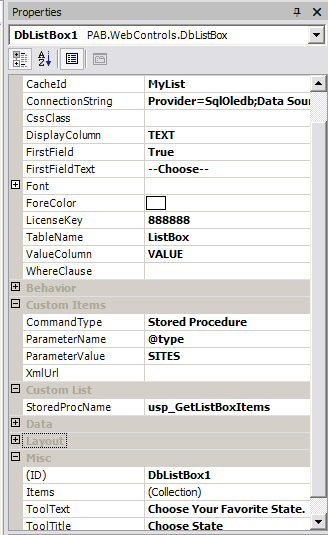
To the left, you can see the custom properties we've created- the
Connection String, Display Column, FirstFieldText, TableName, ValueColumn,
and WhereClause all enable us to fine -tune the desired database action
of the control, and the CacheId property, which should be set to a
different name for controls that load different contents, enables us
to provide the scalability we want.
The downloadable solution
has a Web App test harness illustrating sample usage, and uses
the "Where" clause property to populate two separate
DbListBox controls with different lists of items, even though they
are all coming from the same MSAccess sample database. Certainly
you could enhance this control easily. Perhaps you may want to
add a new property to include a more customized "Order By" clause
in the generated SQL statement, one that might be based on a table
column of your choice that is not used to populate the actual control.
Or, you could enhance it to run a stored procedure as an alternative. |
To build and run the included sample,
make a new folder "dbListboxSoln" under your wwwroot. Unzip this into
your new folder, and make the subfolder C:\Inetpub\wwwroot\DBListboxSoln\DbListBoxWeb into
an IIS virtual directory and Application. Enjoy!
Download the code that accompanies this article
| |
| | Peter Bromberg is a C# MVP, MCP, and .NET consultant who has worked in the banking and financial industry for 20 years. He has architected and developed web - based corporate distributed application solutions since 1995, and focuses exclusively on the .NET Platform. |
|