While database synchronization, it may be possible that conflict may come. This generated
conflict can be of different types.
Types of merge replication conflict
1. Insert-Insert Conflict
2. Update-Update Conflict
3. Update-Delete Conflict
1. Insert- Insert Conflict
This conflict comes, when the record is inserted with same primary key in different
locations.
For example-
In master database, one record has been inserted with primary key value- 6
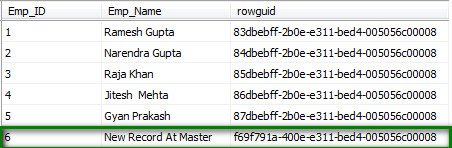
And with the same primary key value (6), one record has been inserted at subscriber.
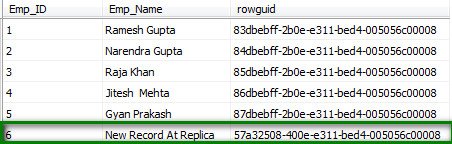
Now, when you will synchronize the database then insert conflict will come because
at both locations record has been inserted with same primary key value -6. To
view this conflict, use “View conflict” option, you will see conflict description-
“A row insert at 'Employee_Replica' could not be propagated to 'Employee_Master'.
This failure can be caused by a constraint violation. Violation of PRIMARY KEY constraint 'PK_tab_Emp'. Cannot insert duplicate key in object 'dbo.tab_Emp'”.
Here, you can see the description of the Insert conflict. It is generating error
regarding “PRIMARY KEY constraint” because value of primary key is same at both
places.
Preventing insert conflict
1. Make primary key as identity column and assign different range for each subscriber
Example-
Subscriber-1 Range (1000-2000)
Subscriber-2 Range (2001-3000)
------------------ -----------------------
Here we can prevent insert conflict because primary key value will not be repeated
at any subscriber.
2. Use Unique Identifier field (GUID) for Primary key
As we know that GUID field is not repeated. So, making primary key as GUID will also
prevent insert conflict.
3. Use combination of keys as primary key
Example-
tab_Transaction(TransID(PK),Col3,Col4)
Suppose tab_Transaction is one table. TransID(PK) can be same at different subscriber.
So, it will generate primary key conflict. To prevent this conflict, we can change
structure of table.
tab_Transaction(TransID, StoreID, Col3,Col4)
Make (TransID, StoreID) as primary key. This will prevent primary key conflict.
2. Update-Update Conflict
This conflict comes, when the same record is updated in different locations.
Example-
In master database, one record has been updated with primary key value- 4
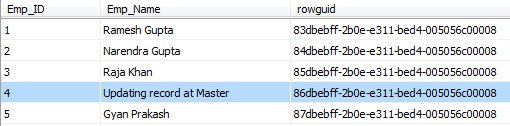
And with the same primary key value (4), one record has been updated at subscriber.
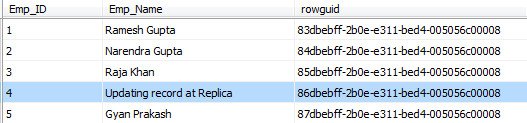
Now, when you will synchronize the database then update conflict will come because
at both locations record has been updated with same primary key value -4. You
can see the conflict description.
Description-
"The same row was updated at both 'Employee_Master' and 'Employee_Replica'.
3. Update-Delete Conflict
This conflict comes, when the record is updated in one location and same record is
deleted in different location.
Example-
In master database, one record has been deleted with primary key value- 4
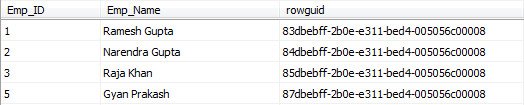
And with the same primary key value (4), one record has been updated at subscriber.
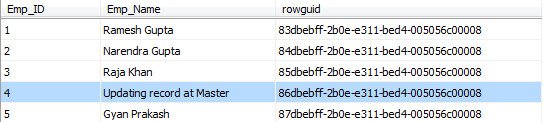
Now, when you will synchronize the database then update-delete conflict will.
Description-
"The same row was updated at 'Employee_Master' and deleted at 'Employee_Replica'.
Resolving conflict in SQL Server
SQL server provides way to resolve the conflict. After viewing the conflict description
you can decide that which record should be reflected.

Here you can submit winner or loser as final changes. Once you will submit the changes,
then it will be reflected to both publisher and subscriber.
Custom conflict handler using C#
Microsoft .Net framework provides support to handle the conflict in replication via
“Microsoft.SqlServer.Replication.BusinessLogicSupport.dll”. You can create custom conflict handler after adding the reference of this .dll file.
Steps-
1. Creation of custom conflict handler
2. Registration of custom conflict handler
3. Setting article resolver (custom conflict handler) for article/table
1. Creation of custom conflict handler
This custom conflict handler will handle update-update and update-delete conflicts.
Update-update conflict- This handler will reflect latest changes as win. To verify latest record, it will
check update time of publisher’s and subscriber’s records.
Note- Table should contain one field to track update time of record.
Update-delete conflict- This handler will reflect “deleted changes” as win. If you need, you can reflect
“updated changes” as win.
Code Implementation (ConflictHandler.cs)
using System;
using System.Collections.Generic;
using System.Linq;
using System.Text;
using Microsoft.SqlServer.Replication.BusinessLogicSupport;
using System.Data;
using System.Data.SqlClient;
namespace ConflictHandler
{
public class ConflictHandler : Microsoft.SqlServer.Replication.BusinessLogicSupport.BusinessLogicModule
{
//To hold Publication Database Name
private string publicationDbName = string.Empty;
//To hold Subscription Database Name
private string subscriptionDbName = string.Empty;
//To hold Article name
private string ARTICLENAME = string.Empty;
//To Hold Publisher Connection String
private string publisherConString = string.Empty;
//To Hold Subscriber Connection String
private string subscriberConString = string.Empty;
// Implement the Initialize method to get publication and subscription information.
public override void Initialize(string publisher, string subscriber, string distributor, string publisherDB,
string subscriberDB, string articleName)
{
//Getting article name to identify conflict table name
ARTICLENAME = articleName;
//Connection string for Publisher DataBase
publisherConString = "PublisherConnectionString";
//Connection string for Subscriber DataBase
subscriberConString = "SubscriberConnectionString";
//Publication DataBase Name
publicationDbName = "PublicationDbName";
//Subscription DataBase Name
subscriptionDbName = "SubscriptionDbName";
}
//Setting which type of conflict to handle
public override ChangeStates HandledChangeStates
{
// Handle updates and deletes.
get { return ChangeStates.UpdateConflicts | ChangeStates.SubscriberUpdatePublisherDeleteConflicts
| ChangeStates.PublisherUpdateSubscriberDeleteConflicts; }
}
//Handler to handle update conflict
//This Handler will reflect latest record as win
public override ActionOnUpdateConflict UpdateConflictsHandler(DataSet publisherDataSet,
DataSet subscriberDataSet, ref DataSet customDataSet, ref ConflictLogType conflictLogType,
ref string customConflictMessage, ref int historyLogLevel, ref string historyLogMessage)
{
try
{
//Getting first row of the Publisher Dataset
DataRow publisherRow = publisherDataSet.Tables[0].Rows[0];
//Query to get update time of Publisher record
string publisherQuery = " SELECT * from " + ARTICLENAME + " where rowguid= '" + Convert.ToString(publisherRow["rowguid"]) + "' ";
//Connecting to publisher database and getting update time for record
DataSet publisherDS = new DataSet();
using (SqlConnection publisherCon = new SqlConnection(publisherConString))
{
publisherCon.Open();
SqlDataAdapter publisherDA = new SqlDataAdapter(publisherQuery, publisherCon);
publisherDA.Fill(publisherDS);
publisherCon.Close();
}
//Getting first row of the subscriber Dataset
DataRow subscriberRow = subscriberDataSet.Tables[0].Rows[0];
//Query to get update time of subscriber record
string subscriberQuery = " SELECT * from " + ARTICLENAME + " where rowguid= '" + Convert.ToString(subscriberRow["rowguid"]) + "' ";
//Connecting to subscriber database and getting update time for record
DataSet subscriberDS = new DataSet();
using (SqlConnection subscriberCon = new SqlConnection(subscriberConString))
{
subscriberCon.Open();
SqlDataAdapter subscriberDA = new SqlDataAdapter(subscriberQuery, subscriberCon);
subscriberDA.Fill(subscriberDS);
subscriberCon.Close();
}
//Checking which is updated record
if (publisherDS.Tables[0].Rows.Count > 0 & subscriberDS.Tables[0].Rows.Count > 0)
{
DateTime pubUpdateTime;
DateTime subUpdateTime;
//Getting update time of Publisher record
pubUpdateTime = Convert.ToDateTime(publisherDS.Tables[0].Rows[0]["UpdateTime"]);
//Getting update time of Subscriber record
subUpdateTime = Convert.ToDateTime(subscriberDS.Tables[0].Rows[0]["UpdateTime"]);
//If publisher record is latest then return publisher record
if (pubUpdateTime >= subUpdateTime)
{
return ActionOnUpdateConflict.AcceptPublisherData;
}
else
{
//else return subscriber record
return ActionOnUpdateConflict.AcceptSubscriberData;
}
}
}
catch (Exception ex)
{
throw new Exception("Error in Custom Conflict Handler. Error- " + ex.Message);
}
//by default return publisher record
return ActionOnUpdateConflict.AcceptPublisherData;
}
//Handler to handle Update-Delete conflict
//This handle will set delete record as win
public override ActionOnUpdateDeleteConflict UpdateDeleteConflictHandler(SourceIdentifier
updateSource, DataSet sourceDataSet, ref DataSet customDataSet, ref ConflictLogType
conflictLogType, ref string customConflictMessage, ref int historyLogLevel, ref
string historyLogMessage)
{
//Setting deleted record as win
return ActionOnUpdateDeleteConflict.AcceptDelete;
}
}
}
Description
Initialize() Method- In this method, I have assigned values for variables. If you want to get current
replication setting then you can get here. I have used following line to get
the conflict table name.
//Getting article name to identify conflict table name
ARTICLENAME = articleName;
In same way, you can get other settings also.
HandledChangeStates() Method- In this method, You can set which kind of conflict we want to handle.
UpdateConflictsHandler() Method- This is the main method to handle update-update conflict. Here, I have written
complete logic to handle update conflict.
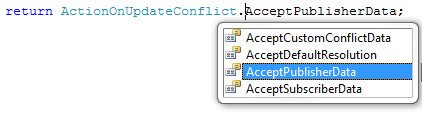
I have written logic to reflect “updated record” as win but you can return following
–
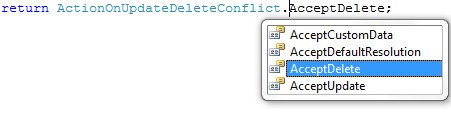
UpdateDeleteConflictHandler() Method- This method is responsible to handle update-delete conflict. Here, I have written
logic to reflect “deleted record” as win but you can return following –
2. Registration of custom conflict handler
Now, you have to register this custom conflict handler in database server. After
building the project, it will create one .dll (ConflictHandler.dll) file. Copy
this .dll file to any location in database server.
Now, execute this script in Distribution database of database server.
Use Distribution;
exec sp_unregistercustomresolver @article_resolver = 'conflictResolverName'
exec sp_registercustomresolver @article_resolver = 'conflictResolverName',
@resolver_clsid = NULL,
@is_dotnet_assembly = 'true',
@dotnet_assembly_name = 'assemblyPath',
@dotnet_class_name ='className'
Here-
'conflictResolverName' - Name of conflict handler (you can give any name)
'assemblyPath' - Location of .dll file (ConflictHandler.dll) in database server
'className' - Full Name of Class including Namespace (Namespace.Classname)
3. Setting article resolver (custom conflict handler) for article/table
Now, you have to set article resolver for article. For this, execute this script.
This script should be run in master database.
use MasterDB
EXEC sp_changemergearticle
@publication = ‘publicationName’,
@article = ‘articleName’,
@property = 'article_resolver',
@value = ‘conflictResolverName’,
@force_invalidate_snapshot = 0,
@force_reinit_subscription = 0;
EXEC sp_changemergearticle
@publication = ‘publicationName’,
@article = ‘articleName’,
@property = 'verify_resolver_signature',
@value = 0,
@force_invalidate_snapshot = 0,
@force_reinit_subscription = 0;
Here –
‘publicationName’ - Name of publication
articleName’ - Name of table
'article_resolver' - article property (keep same)
‘conflictResolverName’ - The name, which you have given while registration
'verify_resolver_signature' - article property (keep same)
You can download the complete code from here: Custom Conflict Handler