easy to work with COM Capable Applications such as Word and Excel.
You can refer the Excel.dll into your application and create the excel file.
Here is the CODE:
1. CREATING NEW EXCEL.APPLICATION:
Application exc =
new Application();
if (exc == null) {
Console.WriteLine("ERROR: EXCEL couldn't be started");
return 0;
}
2. TO MAKE APPLICATION VISIBLE:
exc.set_Visible(0,
true);
3. TO GET THE WORKBOOKS COLLECTION:
Workbooks workbooks = exc.Workbooks;
_Workbook workbook = workbooks.Add(XlWBATemplate.xlWBATWorksheet, 0);
4. TO GET THE WORKSHEETS COLLECTION:
_Worksheet worksheet = (_Worksheet) sheets.get_Item(1);
if (worksheet == null) {
Console.WriteLine ("ERROR in worksheet == null");
}
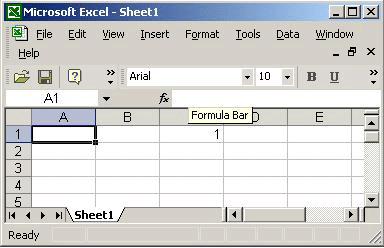
5. TO SET THE VALUE FOR CELL:
Range range1 = worksheet.get_Range("C1", Missing.Value);
if (range1 == null) {
Console.WriteLine ("ERROR: range == null");
}
const int nCells = 1;
Object[] args1 = new Object[1];
args1[0] = nCells;
range1.GetType().InvokeMember("Value", BindingFlags.SetProperty, null, range1, args1);
The Example:
using System;
using System.Reflection; // For Missing.Value and BindingFlags
using System.Runtime.InteropServices; // For COMException
using Excel;
class AutoExcel
{
public static int Main()
{
Application exc = new Application();
if (exc == null)
{
Console.WriteLine("ERROR: EXCEL couldn't be started!");
return 0;
}
exc.set_Visible(0, true);
Workbooks workbooks = exc.Workbooks;
_Workbook workbook = workbooks.Add(XlWBATemplate.xlWBATWorksheet, 0);
Sheets sheets = workbook.Worksheets;
_Worksheet worksheet = (_Worksheet) sheets.get_Item(1);
if (worksheet == null)
{
Console.WriteLine ("ERROR: worksheet == null");
}
Range range1 = worksheet.get_Range("C1", Missing.Value);
if (range1 == null)
{
Console.WriteLine ("ERROR: range == null");
}
const int nCells = 1;
Object[] args1 = new Object[1];
args1[0] = nCells;
range1.GetType().InvokeMember("Value", BindingFlags.SetProperty, null,range1, args1);
return 100;
}
}
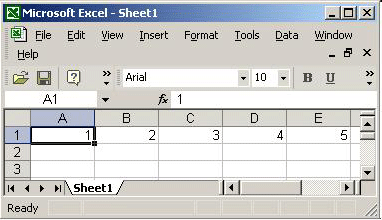
Now let us observe how to send a single dimension array to Excel:
It is similar to set the value for the cell. Only change is we use array as args2[0] = array2.
const
int nCell = 5;
Range range2 = worksheet.get_Range("A1", "E1");
int[] array2 = new int [nCell];
for (int i=0; i < array2.GetLength(0); i++) {
array2[i] = i+1;
}
Object[] args2 = new Object[1];
args2[0] = array2;
range2.GetType().InvokeMember("Value", BindingFlags.SetProperty, null, range2, args2);
The OutPut:
Cheers!