Hello,
Can you set windows Internet explorer to your default browser to accomplish this task< it might fix the issue. Lets try that first.
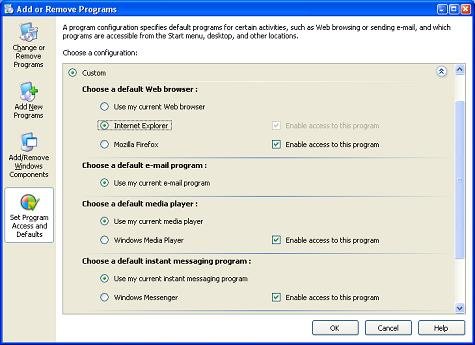
You may use the Set Program Access and Defaults feature to set your default browser. To set Internet Explorer as the default (this repairs the file association settings as well), try this:
From Control Panel, open Add/Remove Programs applet, and choose Set Program Access and Defaults button. [ Alternately, click Start, Run and type control appwiz.cpl,,3 ]
Click the Custom button once. From the list that appears, select Internet Explorer and then click the OK button.