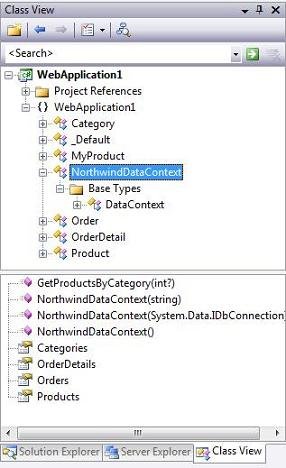
For example, below is the NorthwindDataContext class that is persisted based on the model we designed above:
LINQ to SQL Code Examples
Once we've modeled our database using the LINQ to SQL designer, we can then easily write code to work against it. Below are a few code examples that show off common data tasks:
1) Query Products From the Database
The code below uses LINQ query syntax to retrieve an IEnumerable sequence of Product objects. Note how the code is querying across the Product/Category relationship to only retrieve those products in the "Beverages" category:
C#:

VB:

2) Update a Product in the Database
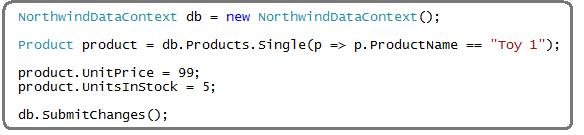
The code below demonstrates how to retrieve a single product from the database, update its price, and then save the changes back to the database:
C#:
VB:
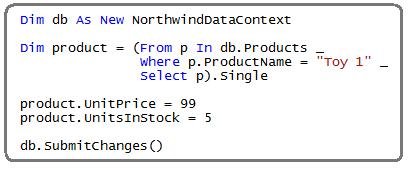
Note: VB in "Orcas" Beta1 doesn't support Lambdas yet. It will, though, in Beta2 - at which point the above query can be rewritten to be more concise.
3) Insert a New Category and Two New Products into the Database
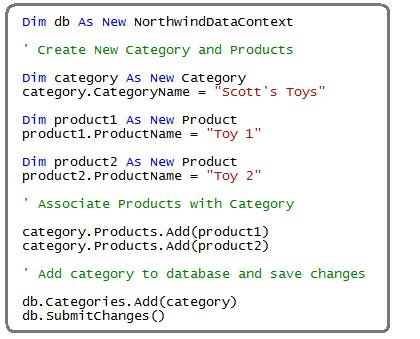
The code below demonstrates how to create a new category, and then create two new products and associate them with the category. All three are then saved into the database.
Note below how I don't need to manually manage the primary key/foreign key relationships. Instead, just by adding the Product objects into the category's "Products" collection, and then by adding the Category object into the DataContext's "Categories" collection, LINQ to SQL will know to automatically persist the appropriate PK/FK relationships for me.
C#

VB:
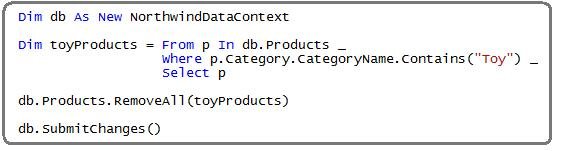
4) Delete Products from the Database
The code below demonstrates how to delete all Toy products from the database:
C#:

VB: