SQL Server - How to sort alfanumeric value in SQL

Asked By Samarth Patel on 03-Sep-11 06:58 AM
Hi

I have one table column and the inserted value are alphanumeric

I want to sort ALPHANUMERIC column
For Example

Before Sorting (Actual data like below

A1
A10
A2
A111

After Sorting I want

A1
A2
A10
A111

But its displaying

A1
A10
A111
A2

Just need a SQL Query for sorting ALPHANUMERIC

Thanks


pete rainbow replied to Samarth Patel on 03-Sep-11 07:35 AM
have you tried sorting by length then by the column

ORDER BY LENGTH(alphaNumColumn) , alphaNumColumn

or a quick and dirty but slow method

SELECT [Column] FROM [Table]
ORDER BY RIGHT(REPLICATE('0', 1000) + LTRIM(RTRIM(CAST([Column] AS VARCHAR(MAX)))), 1000)
otherwise you'll have to create a funtion
Radhika roy replied to Samarth Patel on 03-Sep-11 07:36 AM

Introduction

If your SQL query is not returning the result-set in the order you are expecting, this article may be helpful to fix the issue.

Background

We all know that the ORDER BY keyword is used to sort a result-set by a specified column. It works great for most of the cases. But, for alphanumeric data, it may not return the result-set that you will be expecting. This article explains how this can be fixed easily.

Using the Code

Step 1

I have created a table named “Test” with two columns, as shown below:

The following data has been added to the “Test” table:
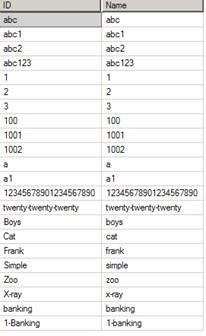
image002.jpg

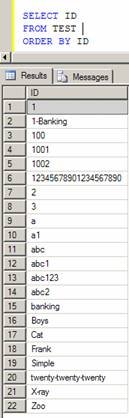
The “Order By” in the following SQL query may not return the result-set in the correct order.

Select ID From TestOrder by ID

image003.jpg

Step 2

I have modified the ORDER BY clause as shown below, and it returned the results in the proper order.

(Note: The ID column is defined as varchar(20). So, I did the following to fix this issue:

  • If ID is numeric, add 21 '0's in front of the ID value and get the last 20 characters
  • If ID is not numeric, add 21 ‘’s at the end of the ID value and get the first 20 characters
Select ID 
From Test
ORDER BY
Case When IsNumeric(ID) = 1 then Right(Replicate('0',21) + ID, 20)
     When IsNumeric(ID) = 0 then Left(ID + Replicate('',21), 20)
     Else ID
End
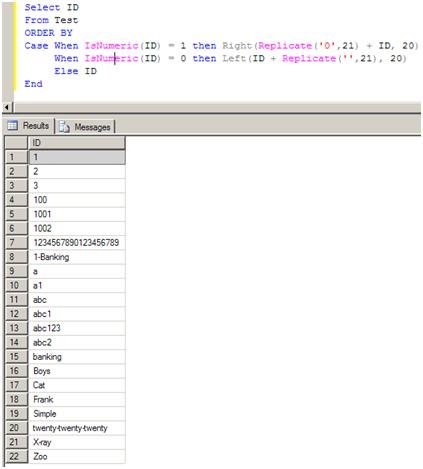
image004.jpg

Step 3

I have changed the query to return the row numbers (used in pagination) and it worked!

(NoteROW_NUMBER works only in SQL Server 2005 and above versions.)

Select Row_Number() Over (Order by
Case When IsNumeric(ID) = 1 then Right(Replicate('0',21) + ID, 20)
                          When IsNumeric(ID) = 0 then Left(ID + Replicate('',21), 20)
                        Else ID
               END) As RowNumber,
ID
From Test
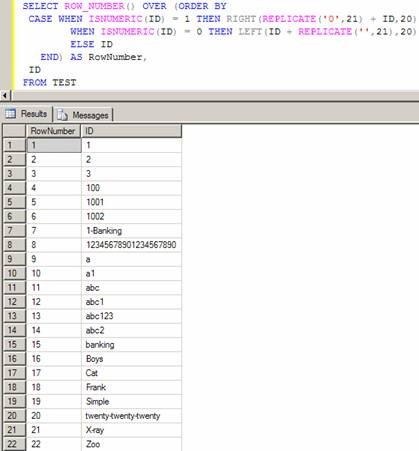
image005.jpg

Any suggestions/comments are welcome!

Points of Interest

There may be better ways of doing this. Please share your thoughts.

here u may get some idea to sort alfanumeric valus in sql

http://social.msdn.microsoft.com/Forums/en-US/sqlsearch/thread/0735fc88-d5f6-4171-8c10-7a410fe154e1/

http://www.mpopp.net/2006/06/sorting-of-numeric-values-mixed-with-alphanumeric-values/

hope this will help u

Radhika roy replied to Samarth Patel on 03-Sep-11 07:39 AM

Hi All,
Today I am representing alphanumeric sorting using sql query. Sometimes we want to sort data like numeric first and after that all alphanumeric data but sql order by clause doesn’t support this functionality. So I have used replicate function for alphanumeric sorting.

Syntax of Replicate Function:
REPLICATE(character_expression, integer_expression)

character_expression 
An alphanumeric expression of character data, or other data types that are implicitly convertible to nvarchar or ntext.
integer_expression 
An expression that can be implicitly converted to int. If integer_expression is negative, a null string is returned.

Now comes to the main point how can we use this function in sql for alphanumeric sorting.

See below script

DECLARE @t TABLE(alphanumeric NVARCHAR(50))
INSERT INTO @t VALUES('1')
INSERT INTO @t VALUES('2')
INSERT INTO @t VALUES('1-s')
INSERT INTO @t VALUES('1-d')
INSERT INTO @t VALUES('1-n')
INSERT INTO @t VALUES('v')
INSERT INTO @t VALUES('m')
INSERT INTO @t VALUES('11')
INSERT INTO @t VALUES('12')
INSERT INTO @t VALUES('22')
INSERT INTO @t VALUES('23')

--SELECT alphanumeric FROM @t ORDER BY alphanumeric

SELECT alphanumeric FROM @t ORDER BY
CASE WHEN ISNUMERIC(alphanumeric) = 1 THEN RIGHT(REPLICATE('0',51) + alphanumeric, 50)
   WHEN ISNUMERIC(alphanumeric) = 0 THEN LEFT(alphanumeric + REPLICATE('',51), 50)
   ELSE alphanumeric
END

Here, I have defined alphanumeric column as NVARCHAR(50) so I have fixed it as following ways
1.    In case of numeric data, I have added 51 zeros in front of the column data and retrieve the last 50 character.
2.    In case of non numeric data, I have added 51 blank spaces at the end of the column data and retrieve the first 50 character.

Reena Jain replied to Samarth Patel on 03-Sep-11 07:43 AM
Hi,

ORDER BY keyword is used to sort a result-set by a specified column. It works great for most of the cases. But, for alphanumeric data, it may not return the result-set that you will be expecting.
so try this or this

SELECT column1
FROM table1
ORDER BY CAST(column1 AS UNSIGNED);

or

ORDER BY len(column), column usually works for me for the generic case of "sorting alphanumeric values by numeric sorting".
dipa ahuja replied to Samarth Patel on 03-Sep-11 07:50 AM
Try this :

SELECT      *
FROM        table1
ORDER BY CAST(SUBSTRING(ID, PATINDEX('%[0-9]%', ID), LEN(ID)) AS int)

Jitendra Faye replied to Samarth Patel on 03-Sep-11 10:23 AM
Try this -

Select Row_Number() Over (Order by
Case When IsNumeric(ID) = 1 then Right(Replicate('0',21) + ID, 20)
                          When IsNumeric(ID) = 0 then Left(ID + Replicate('',21), 20)
                        Else ID
               END) As RowNumber,
ID
From Test


Follow this link-


http://www.codeproject.com/KB/database/AlphanumericSort_SQL.aspx

Here you will get more help.