ASP.NET - GridView Sorting and Paging using jquery

Asked By ARVIND MISHRA on 18-Oct-11 12:34 AM

Hi All ,
I am using jquery for GridView sorting and paging and it is working fine in my app . But where ever images are there in GridView for nevigating to other page , that images are not working properly , i am getting error in my jquery plugin.
I disabled sorting from that column but still i am getting error .I am not getting any solution for that ..

I have added these plugins given below :

<script src="../JavaScript/jquery/jquery-1.6.4.min.js" type="text/javascript"></script>

<script src="../JavaScript/jquery/jquery.tablesorter.js" type="text/javascript"></script>

<script src="../JavaScript/jquery/jquery.tablePagination.0.1.js" type="text/javascript"></script>


Thanks & Regards
Jitendra Faye replied to ARVIND MISHRA on 18-Oct-11 12:40 AM

Using Jquery tablesorter you can perform Sorting in GridView.

Follow this example for GridView sort Using jquery.
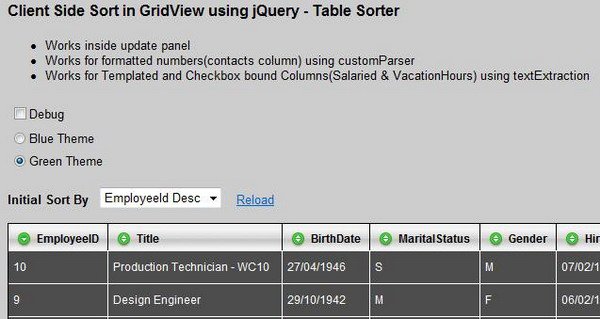
Client Side Sort in GridView using jQuery - Table Sorter


.aspx Page -

<script type="text/javascript" src="scripts/jquery-latest.js"></script>
<script type="text/javascript" src="scripts/jquery.tablesorter.js"></script>
<link rel="stylesheet" type="text/css" href="themes/green/style.css" />

.headerSortUp
{
background-position:top;
background-repeat: no-repeat;
background-image: url(../images/icons/sort_up.gif);
background-color: #e9e7d7;
}
.headerSortDown
{
background-position:top;
background-repeat: no-repeat;
background-image: url(../images/icons/sort_down.gif);
background-color: #e9e7d7;
}


$(document).ready(function()
{
$("#gvEmployees").tablesorter();
});

$("#gvEmployees").tablesorter();

$("#gvEmployees").tablesorter(
{
debug: true, //provides debugging information
sortList: [[0, 1]], //sorts 0th column by descending order
dateFormat: "uk", //sets the date format to dd/MM/yyyy
});


//define a parser
$.tablesorter.addParser(
{
// set a unique id
id: 'formattedNumbers',
is: function(s)
{
// return false so this parser is not auto detected
return false;
},
format: function(s)
{
// format your data for normalization
return s.replace(/,/g, '');
//removes comma separator from formatted numbers
},
// set type, either numeric or text
type: 'numeric'
});
//initialize table for sorting
$("#gvEmployees").tablesorter(
{
headers:
{
6: { sorter: 'formattedNumbers' }
}
});


//define a function for extracting text from node
function extractValue(node)
{
    var children = node.childNodes[0].childNodes.length
    if (children == 0) //boundTextField or a templateColumn
    {
    if (node.childNodes[0].nodeType == 3)//boundTextField
    {
      return node.childNodes[0].data;
    }
    else //template column
    {
      var type = node.childNodes[0].type
      switch (type)
      {
      case "checkbox":
        return node.childNodes[0].checked.toString()
      case "radio":
        return node.childNodes[0].checked.toString()
      case "text":
        return node.childNodes[0].value
      default: return ""
      }
    }
    }
    else //boundCheckboxColumn or a templateLabelColumn
    {
    if (node.childNodes[0].childNodes[0].nodeType == 3)
    {
      return node.childNodes[0].childNodes[0].data;
    }
    else
    {
      return node.childNodes[0].childNodes[0].checked.toString();
    }
    }
}
$("#gvEmployees").tablesorter(
{
    textExtraction: extractValue
});


.Cs Page

protected void Page_Load(object sender, EventArgs e)
{
    if (this.gvEmployees.Rows.Count > 0)
    {
    gvEmployees.UseAccessibleHeader = true;
    gvEmployees.HeaderRow.TableSection = TableRowSection.TableHeader;
    gvEmployees.FooterRow.TableSection = TableRowSection.TableFooter;
    }
}

protected void gvEmployees_DataBound(object sender, EventArgs e)
{
    if (this.gvEmployees.Rows.Count > 0)
    {
    gvEmployees.UseAccessibleHeader = true;
    gvEmployees.HeaderRow.TableSection = TableRowSection.TableHeader;
    gvEmployees.FooterRow.TableSection = TableRowSection.TableFooter;
    }
}

Follow this link -
http://www.codeproject.com/KB/webforms/SortableGridViewjQuery.aspx

Hope this will help you. 

Jitendra Faye replied to ARVIND MISHRA on 18-Oct-11 12:44 AM
For GridView sorting using jquery use this code-


Follow this example-http://www.codeproject.com/KB/webforms/clientside_gridviewpaging/WebSite15.zip

2.JPG 

Here, I would like to show how to use Client Side Gridview Pagination using Jquery Table Pagination Plugin by using


First create a folder called "images". Then paste all the image files into that folder.

1.JPG


Next, add the reference of Jquery and Plugin JavaScript file in the ASPX Page.  

<script src="jquery-1.3.2.min.js" type="text/javascript"></script>
<script src="jquery.tablePagination.0.1.js" type="text/javascript"></script>

Then add the CSS below. Here Width value of #testTable must be the same as the Width of your Gridview control.

#testTable {
      width : 300px;
      margin-left: auto;
      margin-right: auto;
    }
   
     #tablePagination {
      background-color:  Transparent;
      font-size: 0.8em;
      padding: 0px 5px;
      height: 20px
    }
   
    #tablePagination_paginater {
      margin-left: auto;
      margin-right: auto;
    }
   
    #tablePagination img {
      padding: 0px 2px;
    }
   
    #tablePagination_perPage {
      float: left;
    }
   
    #tablePagination_paginater {
      float: right;
    }


Finally, add this script in your ASPX Page:

<script type ="text/javascript" >
 $(document).ready(
  function() {
  $('table').tablePagination({});
  });
  </script>

Now, add Gridview1_PreRender method in code behind, unless during paging you cannot see the Header of Gridview. Generally, Gridview does not use tbody, thead, or tfoot tags for the table that is generated when rendered in the browser. So, for Tbody and Thead, we need to add this function:

 protected void GridView1_PreRender(object sender, EventArgs e)
 {
   GridView1.UseAccessibleHeader = false;
   GridView1.HeaderRow.TableSection = TableRowSection.TableHeader;
 }

YOu can download code from this link-

http://www.codeproject.com/KB/webforms/clientside_gridviewpaging.aspx

Hope this will help you

Asked By ARVIND MISHRA on 18-Oct-11 12:46 AM


Thanks for the response..

If i have "Email image button" to sending a mail , then for that what will do ?

Thanks & Regards
Srikanth K replied to ARVIND MISHRA on 18-Oct-11 01:15 AM
Hi ,
       If you want to send the email just try to implement the ModalPopUp and which has the Email Structure and send the email in the same page.

I think this would be better instead of Navigating to other page.