IIS - http 401.1 - Asked By karur krishna madhu on 21-Dec-11 03:50 AM

HTTP Error 401.1 - Unauthorized: Access is denied due to invalid credentials.
Internet Information Services (IIS).the page appears to be broken.what to do?

Jitendra Faye replied to karur krishna madhu on 21-Dec-11 03:53 AM
This behavior may occur if the following conditions are true:
  • The IIS 6.0 Web site is part of an IIS application pool.
  • The application pool is running under a local account or under a domain user account.
  • The Web site is configured to use Integrated Windows authentication only.


If this behavior occurs when the application pool is running under a local account, follow the steps in the "Workaround" section.

To resolve this behavior when the application pool is running under a domain user account, set up an HTTP SPN with the NetBIOS name and the fully qualified domain name (FQDN) of the domain user account that the application pool is running under. To do this, follow these steps on a domain controller:

Follow this link-

http://support.microsoft.com/kb/871179
smr replied to karur krishna madhu on 21-Dec-11 03:53 AM
hi

To resolve this behavior when the application pool is running under a domain user account, set up an HTTP SPN with the NetBIOS name and the fully qualified domain name (FQDN) of the domain user account that the application pool is running under. To do this, follow these steps on a domain controller:


  1. Install the Setspn.exe tool. To obtain the Microsoft Windows 2000 version of the tool, visit the following Microsoft Web site:
    http://www.microsoft.com/downloads/details.aspx?FamilyID=5fd831fd-ab77-46a3-9cfe-ff01d29e5c46&displaylang=en (http://www.microsoft.com/downloads/details.aspx?FamilyID=5fd831fd-ab77-46a3-9cfe-ff01d29e5c46&displaylang=en)
    To obtain the Setspn.exe tool for Microsoft Windows Server 2003, click the following article number to view the article in the Microsoft Knowledge Base:
    970536  (http://support.microsoft.com/kb/970536/ ) Setspn.exe support tool update for Windows Server 2003
  2. Start a command prompt, and then change to the directory where you installed Setspn.exe.
  3. At the command prompt, type the following commands. Press ENTER after each command:
    setspn.exe -S http/IIS_computer's_NetBIOS_name DomainName\UserName

    setspn.exe -S http/IIS_computer's_FQDN DomainName\UserName
    Note UserName is the user account that the application pool is running under. Also note that if you are running the setspn.exe command on a Windows 2000 machine, use the -A switch instead of the -S switch.
After you set the SPN for the HTTP service to the domain user account that the application pool is running under, you can successfully connect to the Web site without being prompted for your user credentials.

follow
http://social.technet.microsoft.com/Forums/en-US/winservergen/thread/8021eea3-e63e-40cd-8782-828f9a80a3cf/
http://forums.iis.net/t/1158499.aspx
kalpana aparnathi replied to karur krishna madhu on 21-Dec-11 04:06 AM
<!-- Web.Config Configuration File -->

<configuration>

<system.web>
<customErrors mode="Off"/>
</system.web>
</configuration>


Notes: The current error page you are seeing can be replaced by a custom error page by modifying the "defaultRedirect" attribute of the application's <customErrors> configuration tag to point to a custom error page URL.


<!-- Web.Config Configuration File -->


<configuration>

<system.web>
<customErrors mode="RemoteOnly" defaultRedirect="mycustompage.htm"/>
</system.web>
</configuration>
DL M replied to karur krishna madhu on 21-Dec-11 05:07 AM
dipa ahuja replied to karur krishna madhu on 21-Dec-11 05:53 AM

Symptoms

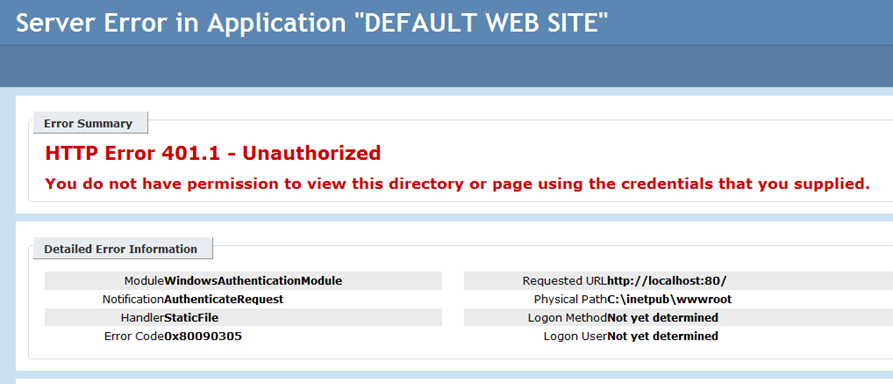
You have an IIS 7.5 server hosted on Windows Server 2008 R2/Windows 7 and when you try to browse to the site over Windows Integrated authentication it fails with 401.1 like below:
image

Module WindowsAuthenticationModule

Notification AuthenticateRequest

Handler StaticFile

Error Code 0x80090305

Resolution

To resolve this issue we need to restart W3SVC service as below from the command prompt:

> net stop w3svc

> net start w3svc

Or simply run IISRESET.

*Remember recycling application pool won’t resolve the issue. It’s the WWW service that has to be restarted.