Hi,
A site collection can be as large as the content database size limit for the applicable usage scenario
In general, we strongly recommend limiting the size of site collections to 100 GB for the following reasons:
- Certain
site collection actions, such as site collection backup/restore or the
Windows PowerShell cmdlet Move-SPSite, cause large Microsoft SQL Server
operations which can affect performance or fail if other site
collections are active in the same database.
- SharePoint
site collection backup and restore is only supported for a maximum site
collection size of 100 GB. For larger site collections, the entire
content database must be backed up. If multiple site collections larger
than 100 GB are contained in a single content database, backup and
restore operations can take a long time and are at risk of failure.
The Solution – Site Collection Quotas
Fortunately SharePoint 2010 provides exactly this functionality
through Quota Templates. A Quota Template allows you to specify the
maximum amount of content that can be stored within a Site Collection
and then inform you and Site Collection Administrators when this limit
is approaching. In SharePoint 2010 we also have the ability to limit
resource usage for Sandbox Solutions as well.
Before we get into this a couple of things to note:
· All files contribute to the quota: This includes Master Pages, List Items, Documents and so forth
· Quotas can only be applied to Site Collections:
This means that all Sites within the Site Collection contribute to the
quota. Hence it’s a really, really good reason to make sure that all
collaboration sites exist in their own Site Collection, rather than
their own Site.
· The Recycle Bin also contributes to the quota: A great reason for Site Admins to keep on top of items in the recycle bin.
· The last item uploaded that takes the site over quota can be any size: If you have 2MB left on your quota, and you upload a 10MB file it will still upload. It won’t stop halfway through
So let’s get configuring!
Step 1) Create a Quota Template
First step is to create a Quota Template to use. Navigate to Central
Administration-> Application Management->Specify Quota Templates
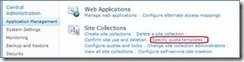
From here we can either create a new Template or modify an existing
template. Its worth mentioning that if you modify an existing template
it will not retroactively apply to Site Collections already created with
the template, only to new templates.
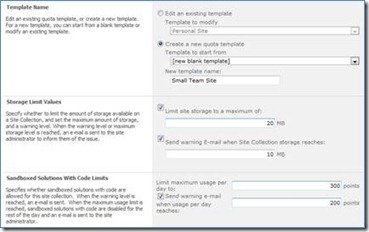
So I’m going to create a new template called ‘Small Team Site’ with a
max storage of 20MB for demo purposes. I am also going to specify
Sandbox Solutions Code Limits as well. Once this is done our Quota is
ready to go.
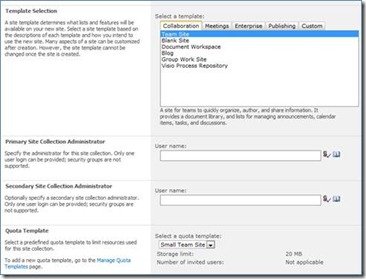
Now if go and create a Site Collection at the bottom of the page we can specify a Quota Template to apply.
So what happens when the quota is breached? You can easily control
and change Site Collection Quotas from the ‘Site Collection Quotas and
Locks’ page. Navigate to Central Administration-> Application
Management->Configure Quotas and Locks.
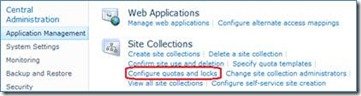
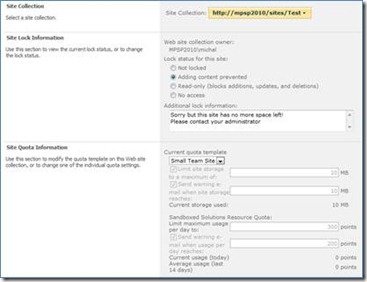
There are a number of actions available here. For each Site
Collection you can specify the Site Lock Information to take such as Not
Locked, Adding content prevented, Read Only and No Access. You should
also specify the ‘Additional Lock Information’ as well. This will
present an information message to users when the quota has been
breached.
You can also change Site Quotas from this page to add or remove storage as you see fit:
But be careful about the type of lock as it can confuse users. For
example if you specify a read-only block users will be able to see the
site but they will be greeted with greyed out ribbon actions since no
edits can take place:
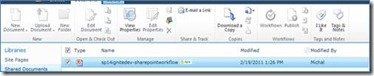
However they still can add Tags and Notes since these don’t reside as
part of the Site Collection so things can get confusing quick.
So we now have a quick and easy way to govern the growth of content
in our Site Collections. Honestly you really should be using Site
Collection quota’s on every single Site Collection you have. You will be
amazed at how quickly Site Collections can grow out of control. Site
Collection quotas provide you will all the necessary tools to be in
control.
Hope it helps you.